# Drawer Box

# Upcut Saw Instruction Procedure

<span style="text-decoration: underline;"><span style="color: rgb(0, 0, 0); text-decoration: underline;">**Purpose**</span></span>

<span style="color: rgb(0, 0, 0);">**Using the Upcut saw will provide you with digital accuracy and a cleaner and smoother cut**</span>

<details id="bkmrk-powering-on-machine-"><summary>Powering on Machine</summary>

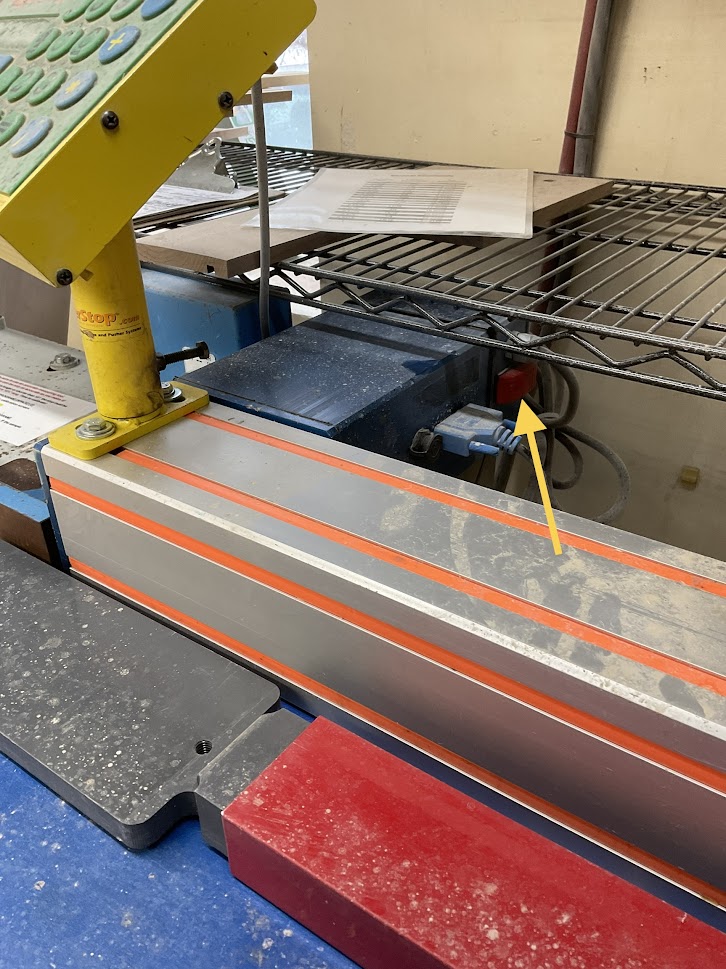
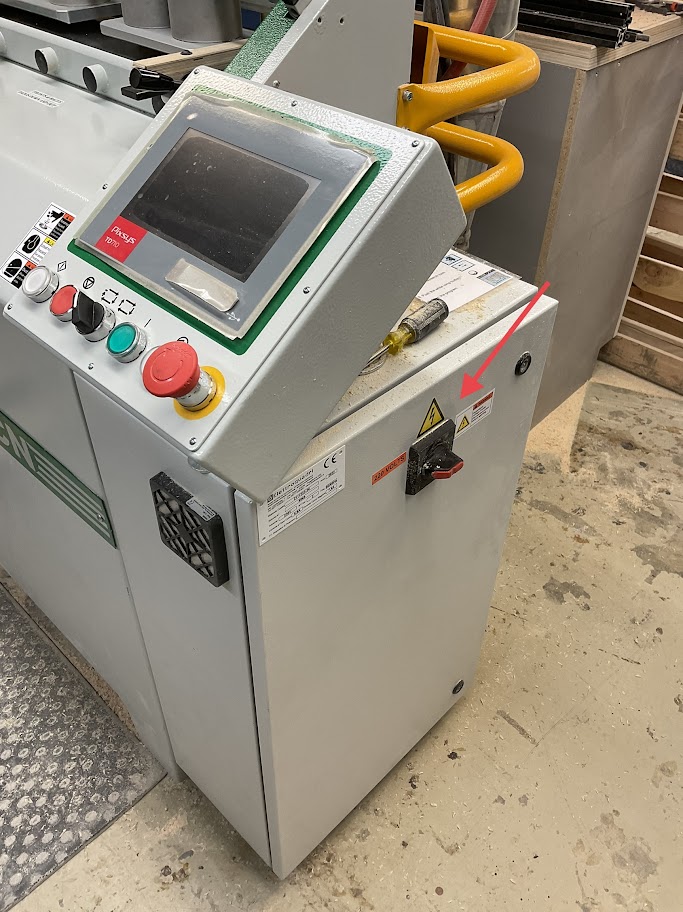
<table border="1" class="align-center" style="border-collapse: collapse; width: 100%; border-width: 0px; height: 349px;"><colgroup><col style="width: 50%;"></col><col style="width: 50%;"></col></colgroup><tbody><tr style="height: 349px;"><td class="align-left" style="border-width: 0px; vertical-align: middle; height: 349px;">**1. Turn on the control panel by pressing the red switch located on the right side of the blue electrical box behind the control panel**

</td><td style="border-width: 0px; height: 349px;">**[![Image 1.jpg](http://help.homesteadcabinet.net/uploads/images/gallery/2023-01/scaled-1680-/U5Vimage-1.jpg)](http://help.homesteadcabinet.net/uploads/images/gallery/2023-01/U5Vimage-1.jpg)**</td></tr></tbody></table>

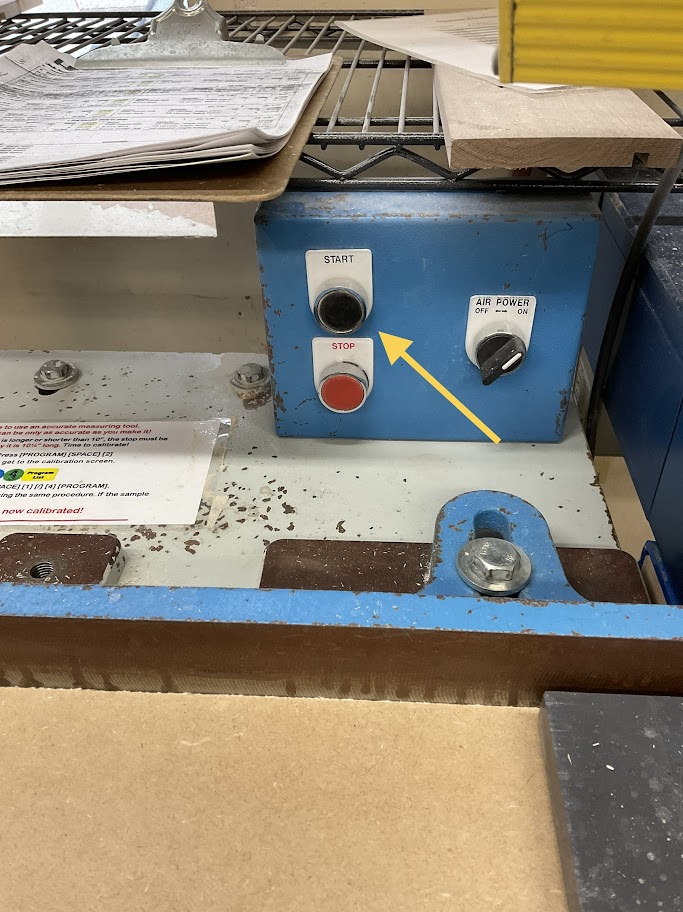
<table border="1" class="align-center" style="border-collapse: collapse; width: 100%; border-width: 0px; height: 349px;"><colgroup><col style="width: 50%;"></col><col style="width: 50%;"></col></colgroup><tbody><tr style="height: 349px;"><td class="align-left" style="border-width: 0px; vertical-align: middle; height: 349px;">**2. Turn on the saw by pressing the black start button located on the blue electrical box located left of the control panel**

  
</td><td style="border-width: 0px; height: 349px;">**[![Image 2.jpg](http://help.homesteadcabinet.net/uploads/images/gallery/2023-01/scaled-1680-/rUjimage-2.jpg)](http://help.homesteadcabinet.net/uploads/images/gallery/2023-01/rUjimage-2.jpg)**</td></tr></tbody></table>

</details><details id="bkmrk-calibrating-machine-"><summary>Calibrating Machine</summary>

**3. On the control panel Press ("Program List", "Space Calib",2) This will bring up the calibration screen**

**4. Enter 1, 0, "Space Calib", 1, /, 4, "Program List"**

<p class="callout info">***Steps 3 and 4 only need to be done in the morning before the shift starts***</p>

</details><details id="bkmrk-running-machine-5.-u"><summary>Running Machine</summary>

**5. Using the decimal equivalents enter your length to be cut**

<p class="callout info">***For example if your length is 12 1/2 inches you will enter 12.***</p>

**6. Press "Start"**

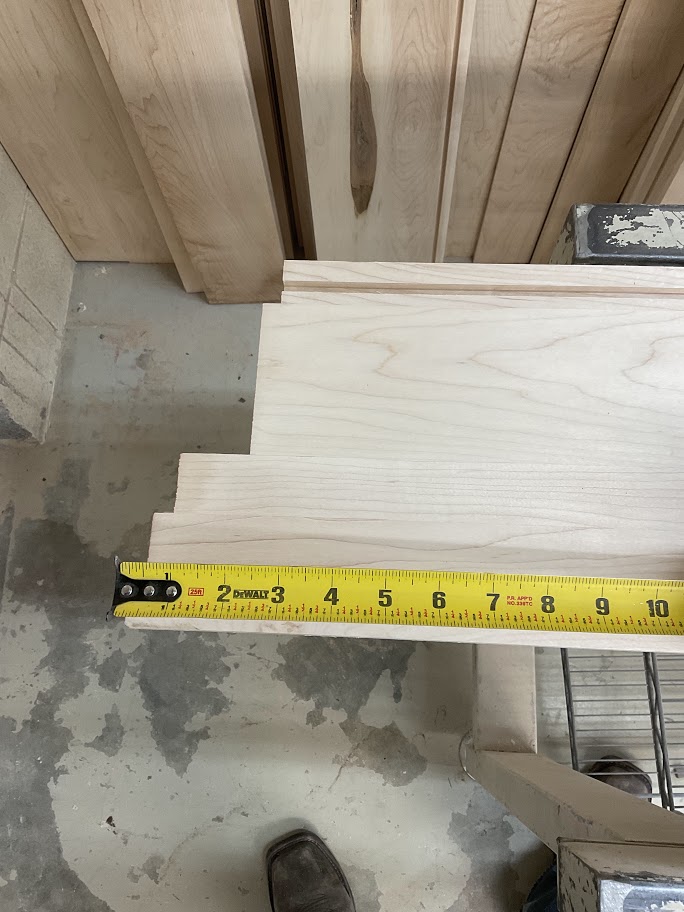
<table border="1" class="align-center" style="border-collapse: collapse; width: 100%; border-width: 0px; height: 349px;"><colgroup><col style="width: 50%;"></col><col style="width: 50%;"></col></colgroup><tbody><tr style="height: 349px;"><td class="align-left" style="border-width: 0px; vertical-align: middle; height: 349px;">**7. Measure the length of damage on the board to be cut**

</td><td style="border-width: 0px; height: 349px;">**[![Image 3.jpg](http://help.homesteadcabinet.net/uploads/images/gallery/2023-01/scaled-1680-/JG7image-3.jpg)](http://help.homesteadcabinet.net/uploads/images/gallery/2023-01/JG7image-3.jpg)**</td></tr></tbody></table>

**8. Press "+", enter the damaged length the press "=" then press the "Start" button**

<p class="callout info">***For example our desired length is 12.5 inches and we have 4 inches of damage this step will make your cut length 16.5 inches***</p>

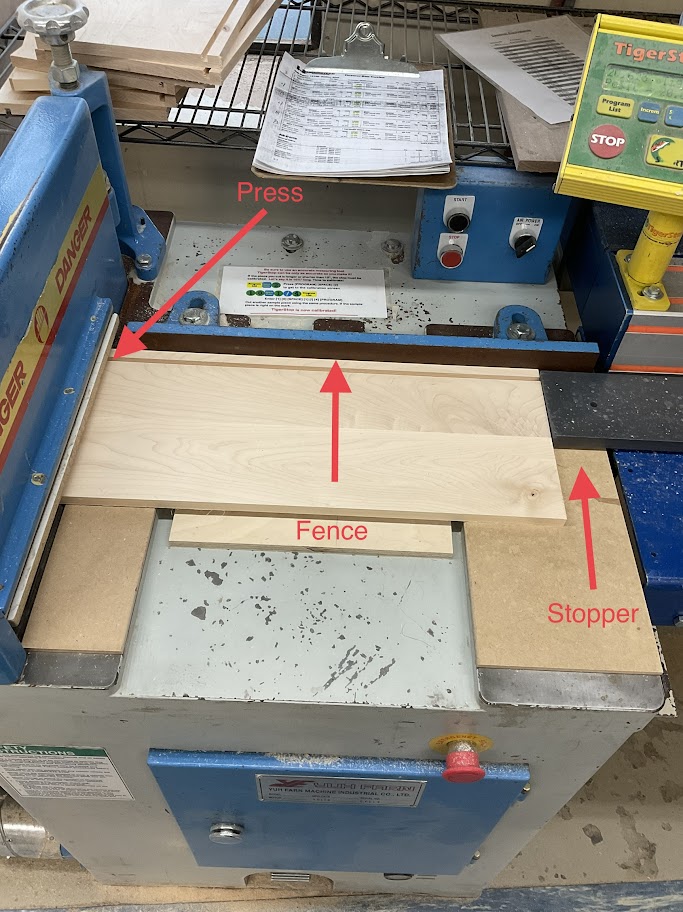
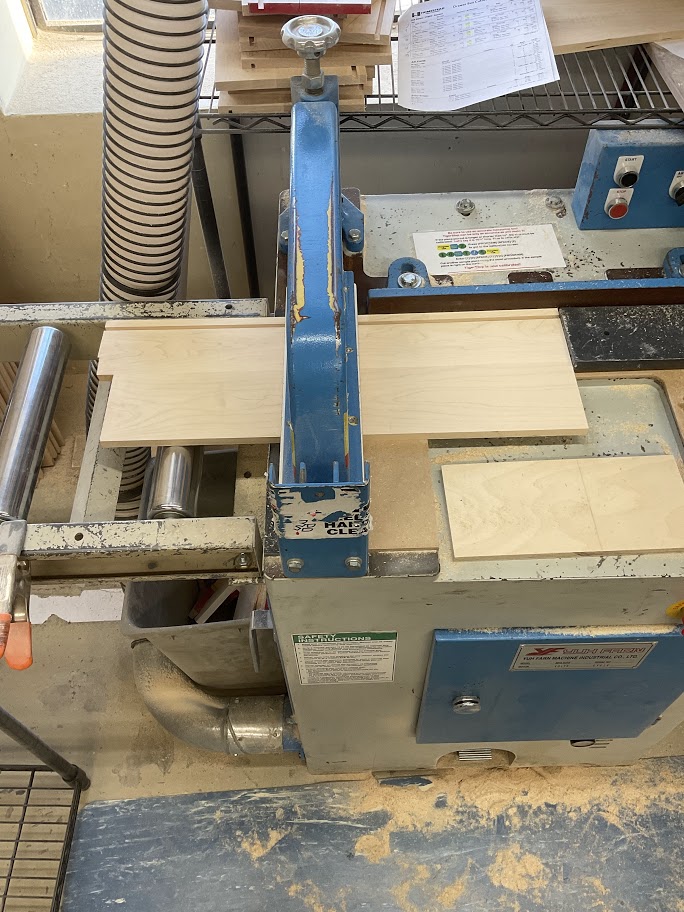
<table border="1" class="align-center" style="border-collapse: collapse; width: 100%; border-width: 0px; height: 349px;"><colgroup><col style="width: 50%;"></col><col style="width: 50%;"></col></colgroup><tbody><tr style="height: 349px;"><td class="align-left" style="border-width: 0px; vertical-align: middle; height: 349px;">**9. Run your board through the press, flat against the fence to the stopper**

  
</td><td style="border-width: 0px; height: 349px;">**[![Image 4.jpg](http://help.homesteadcabinet.net/uploads/images/gallery/2023-01/scaled-1680-/mVsimage-4.jpg)](http://help.homesteadcabinet.net/uploads/images/gallery/2023-01/mVsimage-4.jpg)**</td></tr></tbody></table>

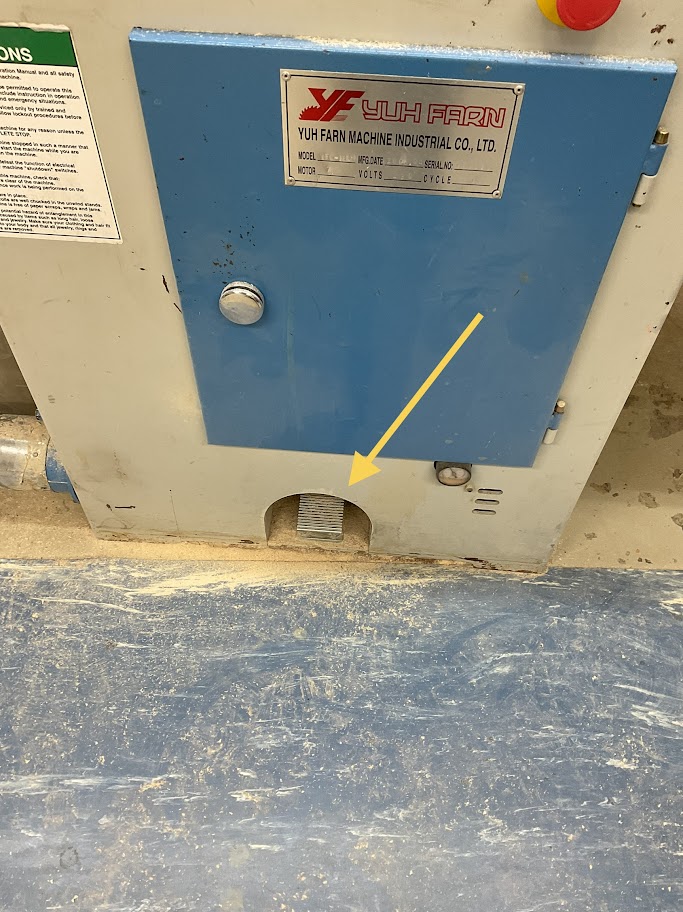
<table border="1" class="align-center" style="border-collapse: collapse; width: 100%; border-width: 0px; height: 349px;"><colgroup><col style="width: 50%;"></col><col style="width: 50%;"></col></colgroup><tbody><tr style="height: 349px;"><td class="align-left" style="border-width: 0px; vertical-align: middle; height: 349px;">**10. Once the board is in place press the foot pedal located below the machine**

  
</td><td style="border-width: 0px; height: 349px;">**[![Image 5.jpg](http://help.homesteadcabinet.net/uploads/images/gallery/2023-01/scaled-1680-/CWHimage-5.jpg)](http://help.homesteadcabinet.net/uploads/images/gallery/2023-01/CWHimage-5.jpg)**</td></tr></tbody></table>

**11. When the board is cut press "-", re-enter the damaged length then "=" then the "Start" button**

<p class="callout info">***This step will take off the 4 inches you added and put you back to your desired 12.5 inches***</p>

<table border="1" class="align-center" style="border-collapse: collapse; width: 100%; border-width: 0px; height: 349px;"><colgroup><col style="width: 50%;"></col><col style="width: 50%;"></col></colgroup><tbody><tr style="height: 349px;"><td class="align-left" style="border-width: 0px; vertical-align: middle; height: 349px;">**12. Rotate the board where the damaged length is out and then press the foot pedal to cut off the damaged length**

  
</td><td style="border-width: 0px; height: 349px;">**[![Image 6.jpg](http://help.homesteadcabinet.net/uploads/images/gallery/2023-01/scaled-1680-/tTDimage-6.jpg)](http://help.homesteadcabinet.net/uploads/images/gallery/2023-01/tTDimage-6.jpg)**</td></tr></tbody></table>

<p class="callout info">***Note that steps 3, 4, and 7 are only needed when cutting a new board***  
</p>

</details><details id="bkmrk-powering-off-machine"><summary>Powering off Machine</summary>

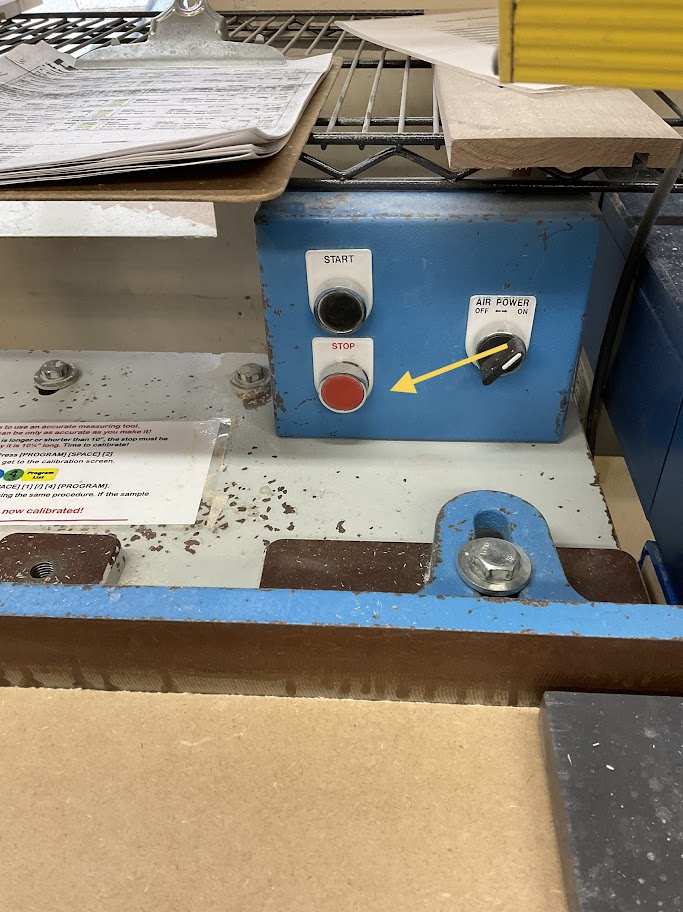
<table border="1" class="align-center" style="border-collapse: collapse; width: 100%; border-width: 0px; height: 349px;"><colgroup><col style="width: 50%;"></col><col style="width: 50%;"></col></colgroup><tbody><tr style="height: 349px;"><td class="align-left" style="border-width: 0px; vertical-align: middle; height: 349px;">**13. Turn off the saw by pressing the red stop button on the blue electrical box located left of the control panel**

  
</td><td style="border-width: 0px; height: 349px;">**[![Image 7.jpg](http://help.homesteadcabinet.net/uploads/images/gallery/2023-01/scaled-1680-/wQWimage-7.jpg)](http://help.homesteadcabinet.net/uploads/images/gallery/2023-01/wQWimage-7.jpg)**</td></tr></tbody></table>

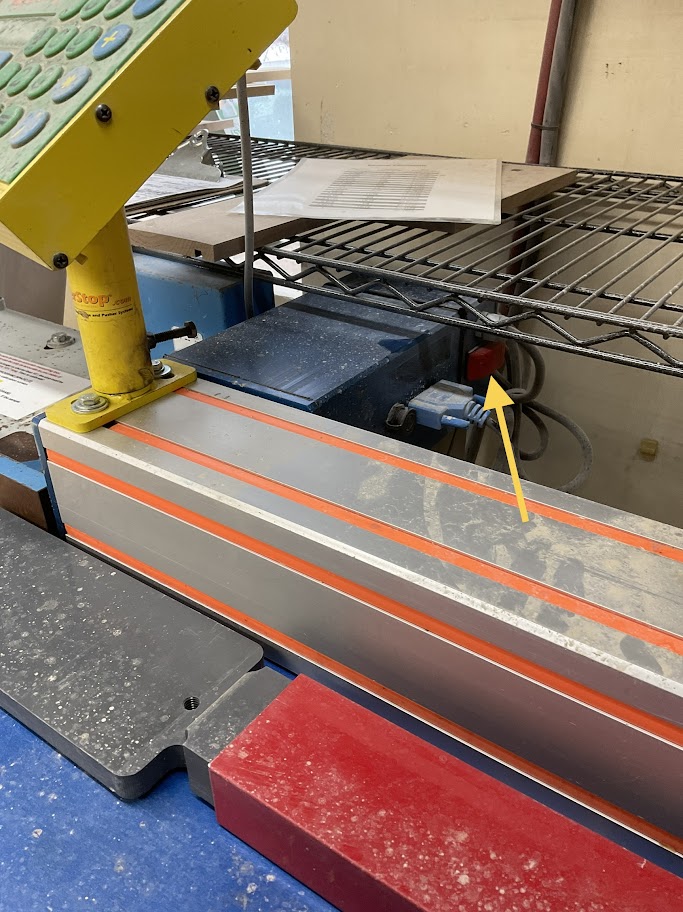
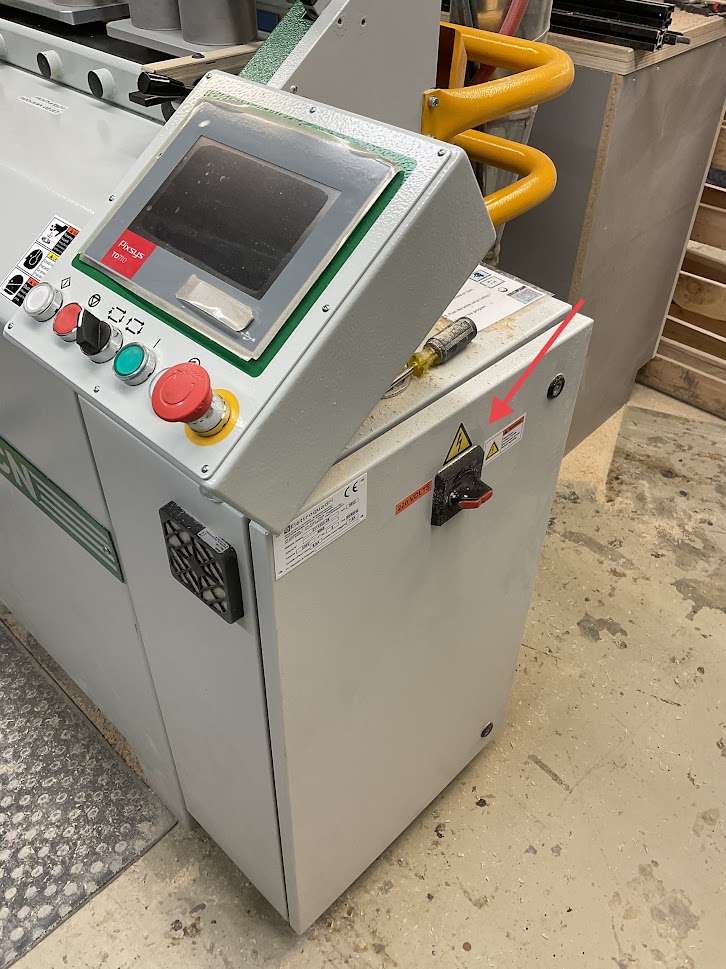
<table border="1" class="align-center" style="border-collapse: collapse; width: 100%; border-width: 0px; height: 349px;"><colgroup><col style="width: 50%;"></col><col style="width: 50%;"></col></colgroup><tbody><tr style="height: 349px;"><td class="align-left" style="border-width: 0px; vertical-align: middle; height: 349px;">**14. Turn off the control panel by pressing the red switch located on the right side of the blue electrical box behind the control panel**

  
</td><td style="border-width: 0px; height: 349px;">**[![Image 8.jpg](http://help.homesteadcabinet.net/uploads/images/gallery/2023-01/scaled-1680-/HUbimage-8.jpg)](http://help.homesteadcabinet.net/uploads/images/gallery/2023-01/HUbimage-8.jpg)**</td></tr></tbody></table>

</details>

# Lock Dowel Drawer Box Instruction Procedure

<span style="text-decoration: underline;">**Purpose**</span>

**Lock dowels are used to create a clean non fastener look for melamine boxes**

<details id="bkmrk-%C2%A0"><summary>Drawer Box Assembly</summary>

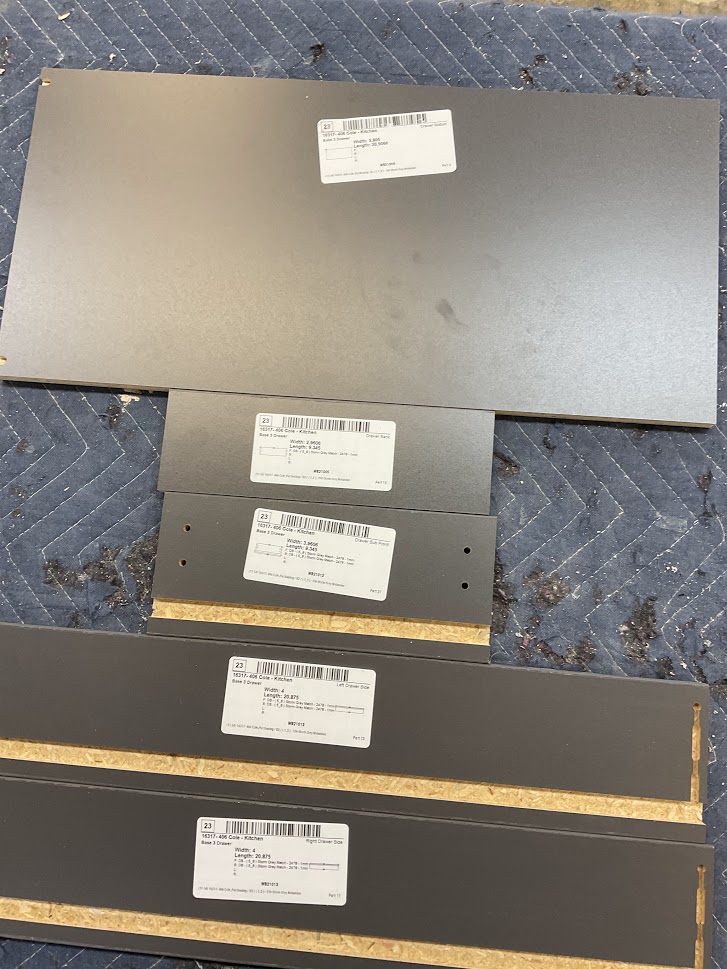
<table border="1" class="align-center" style="border-collapse: collapse; width: 100%; border-width: 0px; height: 349px;"><colgroup><col style="width: 50%;"></col><col style="width: 50%;"></col></colgroup><tbody><tr style="height: 349px;"><td class="align-left" style="border-width: 0px; vertical-align: middle; height: 349px;">**1. Gather all your parts by reading the labels**

<p class="callout info">***Labels will be coordinated with a number in the top right corner with Left, Right, Front, Back, and Bottom***</p>

</td><td style="border-width: 0px; height: 349px;">**[![Image 1.jpg](http://help.homesteadcabinet.net/uploads/images/gallery/2023-01/scaled-1680-/pLDimage-1.jpg)](http://help.homesteadcabinet.net/uploads/images/gallery/2023-01/pLDimage-1.jpg)**</td></tr></tbody></table>

**2. Inspect all your parts for imperfections before starting**

<p class="callout warning">***If imperfections are found, show them to your supervisor and they will direct you to the proper method to fix it or instruct you to have the part recut***</p>

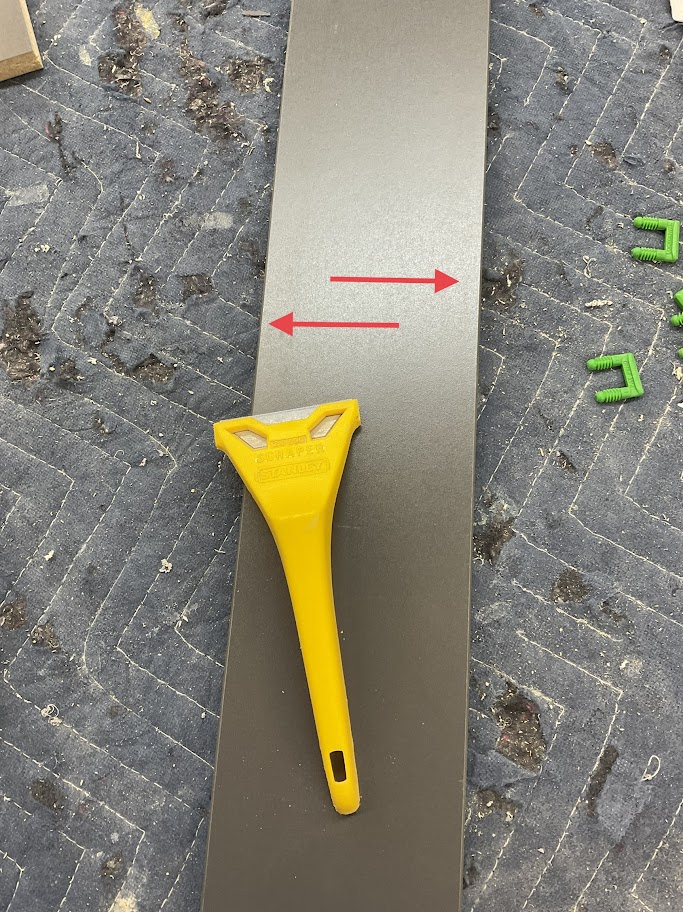
<table border="1" class="align-center" style="border-collapse: collapse; width: 100%; border-width: 0px; height: 349px;"><colgroup><col style="width: 50%;"></col><col style="width: 50%;"></col></colgroup><tbody><tr style="height: 349px;"><td class="align-left" style="border-width: 0px; vertical-align: middle; height: 349px;">**3. Using the proper tool, clean the edges of each part of any glue or hang over**

</td><td style="border-width: 0px; height: 349px;">**[![Image 2.jpg](http://help.homesteadcabinet.net/uploads/images/gallery/2023-01/scaled-1680-/NWpimage-2.jpg)](http://help.homesteadcabinet.net/uploads/images/gallery/2023-01/NWpimage-2.jpg)**</td></tr></tbody></table>

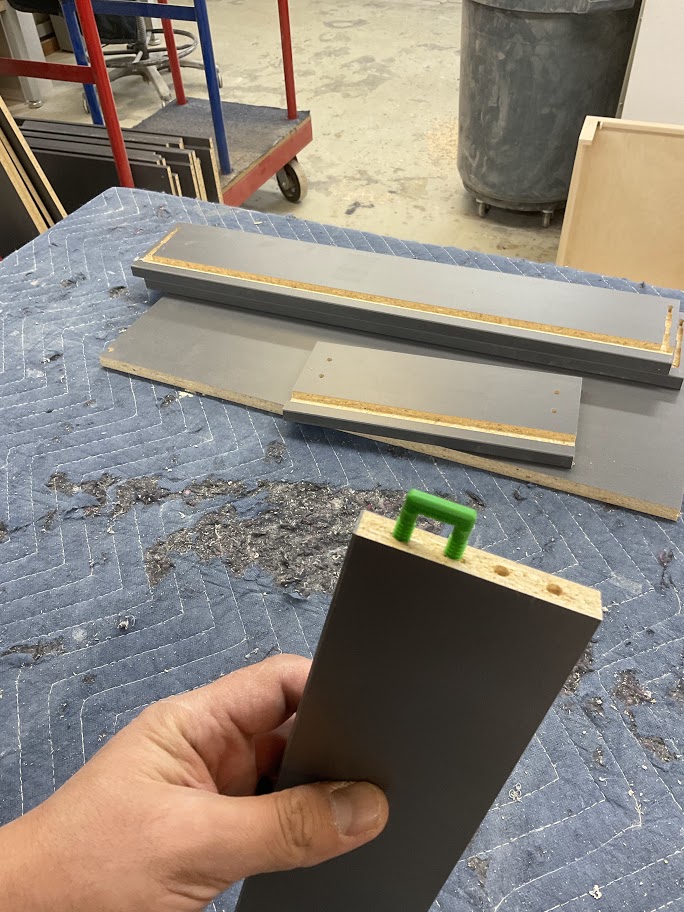
<table border="1" class="align-center" style="border-collapse: collapse; width: 100%; border-width: 0px; height: 349px;"><colgroup><col style="width: 50%;"></col><col style="width: 50%;"></col></colgroup><tbody><tr style="height: 349px;"><td class="align-left" style="border-width: 0px; vertical-align: middle; height: 349px;">**4. Place lock dowels in the designated per drilled holes**

</td><td style="border-width: 0px; height: 349px;">**[![Image 3.jpg](http://help.homesteadcabinet.net/uploads/images/gallery/2023-01/scaled-1680-/uQHimage-3.jpg)](http://help.homesteadcabinet.net/uploads/images/gallery/2023-01/uQHimage-3.jpg)**</td></tr></tbody></table>

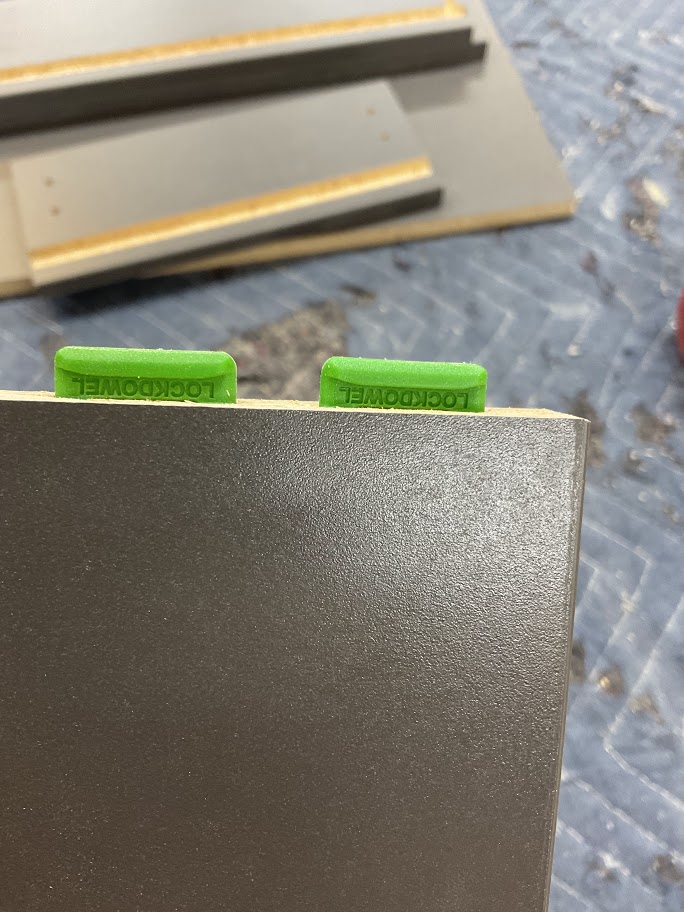
<table border="1" class="align-center" style="border-collapse: collapse; width: 100%; border-width: 0px; height: 349px;"><colgroup><col style="width: 50%;"></col><col style="width: 50%;"></col></colgroup><tbody><tr style="height: 349px;"><td class="align-left" style="border-width: 0px; vertical-align: middle; height: 349px;">**5. Using a soft mallet, lightly tap the lock dowel down till the bottom of the dowel is flush with part**

</td><td style="border-width: 0px; height: 349px;">**[![Image 4.jpg](http://help.homesteadcabinet.net/uploads/images/gallery/2023-01/scaled-1680-/iuOimage-4.jpg)](http://help.homesteadcabinet.net/uploads/images/gallery/2023-01/iuOimage-4.jpg)**</td></tr></tbody></table>

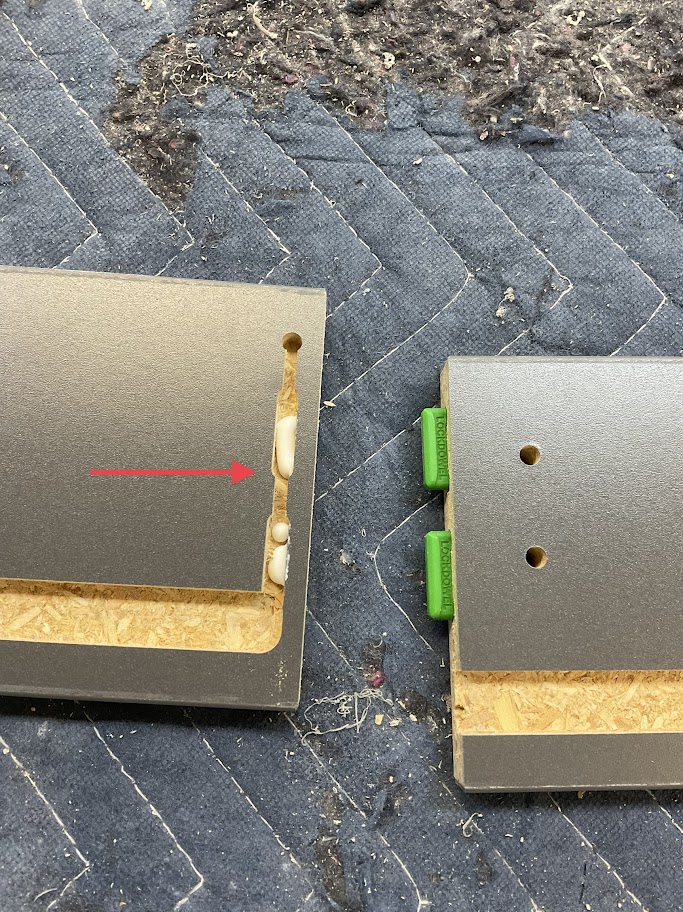
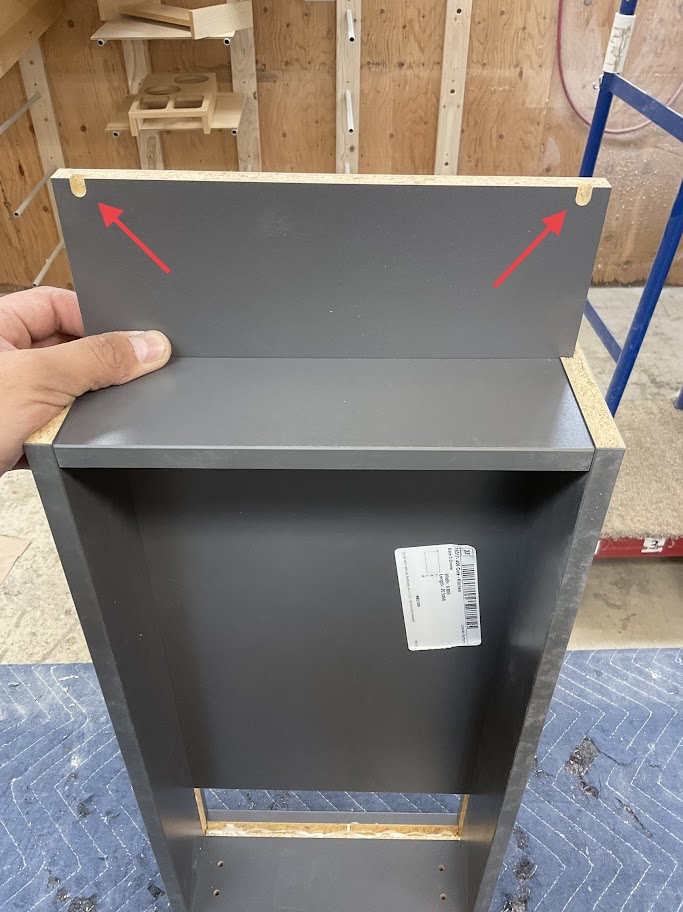
<table border="1" class="align-center" style="border-collapse: collapse; width: 100%; border-width: 0px; height: 349px;"><colgroup><col style="width: 50%;"></col><col style="width: 50%;"></col></colgroup><tbody><tr style="height: 349px;"><td class="align-left" style="border-width: 0px; vertical-align: middle; height: 349px;">**6. Place glue in the coordinating keyhole slots**

</td><td style="border-width: 0px; height: 349px;">**[![Image 5.jpg](http://help.homesteadcabinet.net/uploads/images/gallery/2023-01/scaled-1680-/4ATimage-5.jpg)](http://help.homesteadcabinet.net/uploads/images/gallery/2023-01/4ATimage-5.jpg)**</td></tr></tbody></table>

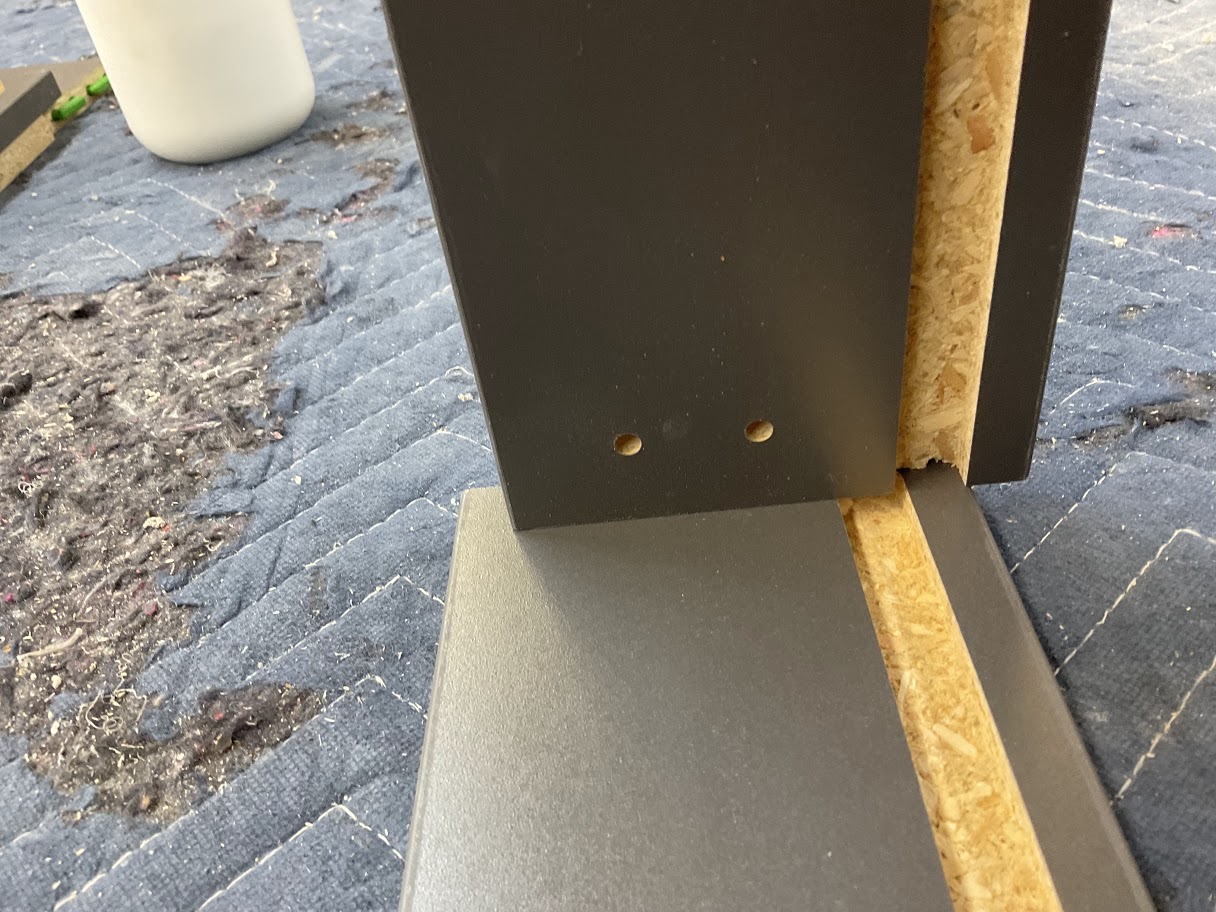
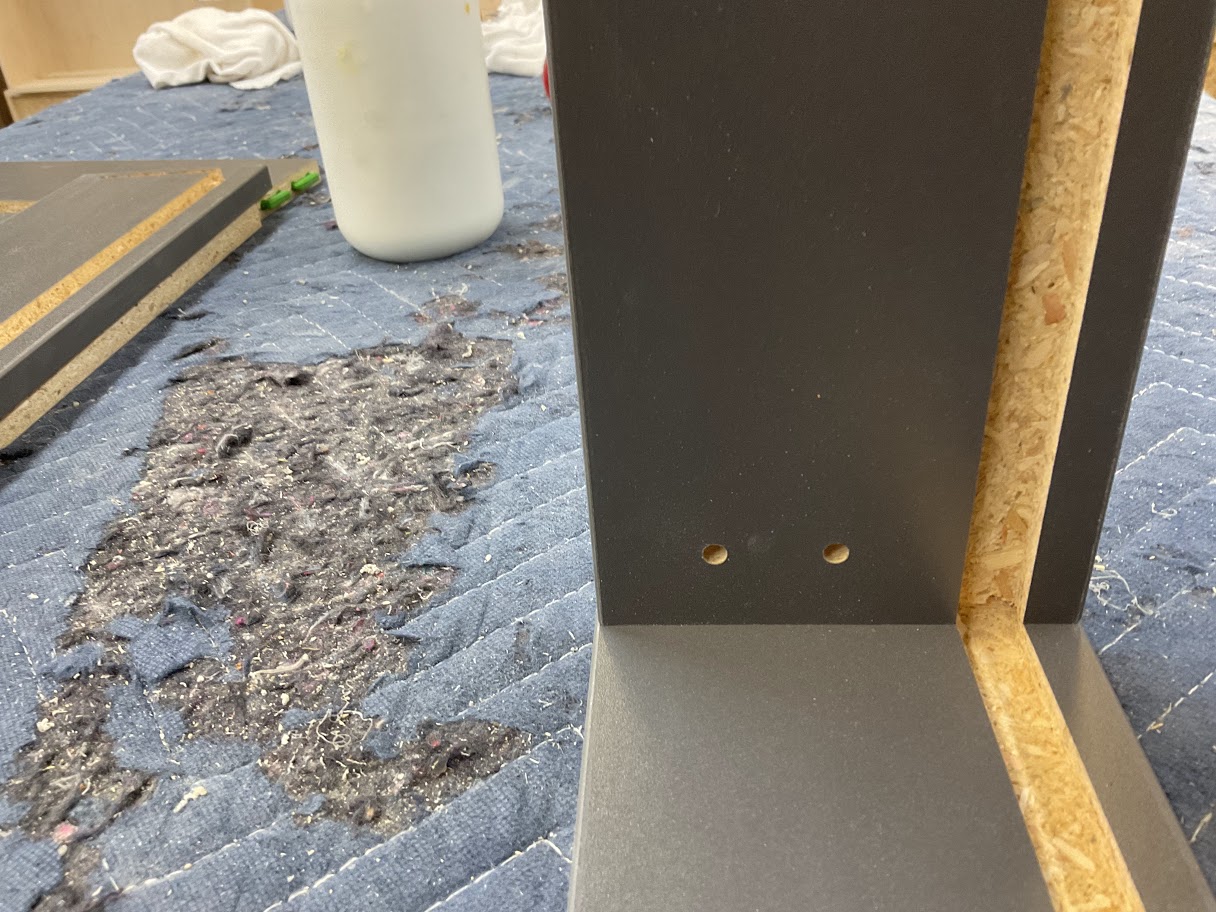
<table border="1" class="align-center" style="border-collapse: collapse; width: 100%; border-width: 0px; height: 349px;"><colgroup><col style="width: 50%;"></col><col style="width: 50%;"></col></colgroup><tbody><tr style="height: 349px;"><td class="align-left" style="border-width: 0px; vertical-align: middle; height: 349px;">**7. Insert the Lock Dowell into the coordinating keyhole slot to create the locking mechanism**

</td><td style="border-width: 0px; height: 349px;">**[![Image 6.jpg](http://help.homesteadcabinet.net/uploads/images/gallery/2023-01/scaled-1680-/ammimage-6.jpg)](http://help.homesteadcabinet.net/uploads/images/gallery/2023-01/ammimage-6.jpg)**</td></tr></tbody></table>

<table border="1" class="align-center" style="border-collapse: collapse; width: 100%; border-width: 0px; height: 349px;"><colgroup><col style="width: 50%;"></col><col style="width: 50%;"></col></colgroup><tbody><tr style="height: 349px;"><td class="align-left" style="border-width: 0px; vertical-align: middle; height: 349px;">**8. Push the part up to lock in place**

</td><td style="border-width: 0px; height: 349px;">**[![Image 7.jpg](http://help.homesteadcabinet.net/uploads/images/gallery/2023-01/scaled-1680-/oUXimage-7.jpg)](http://help.homesteadcabinet.net/uploads/images/gallery/2023-01/oUXimage-7.jpg)**</td></tr></tbody></table>

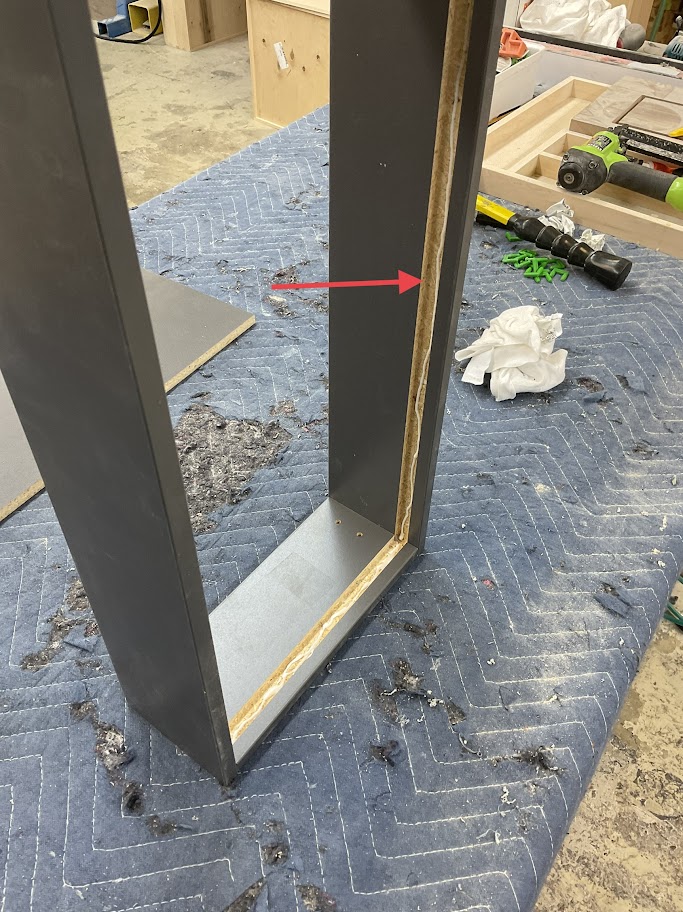
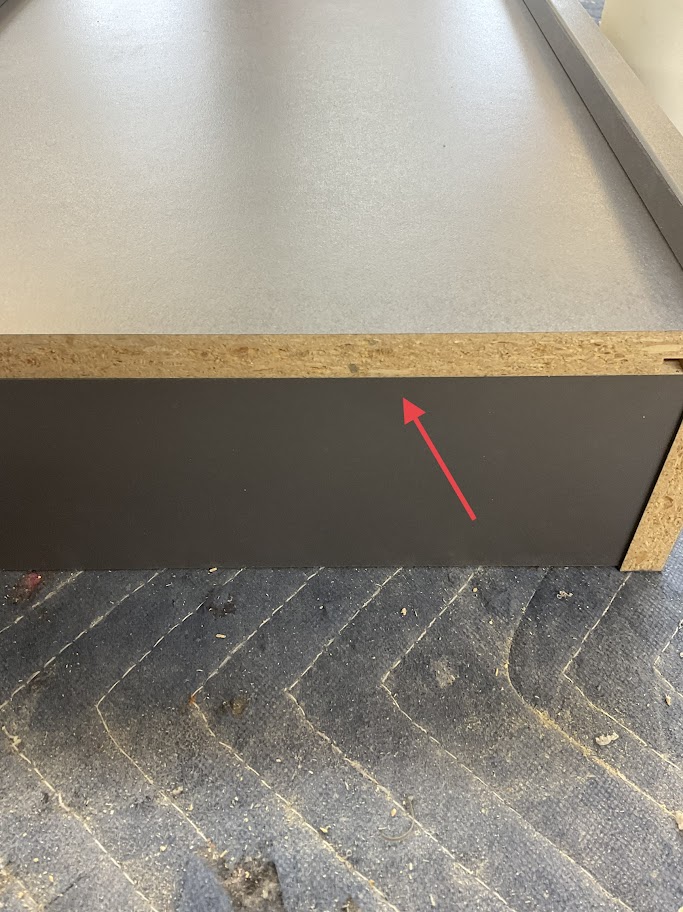
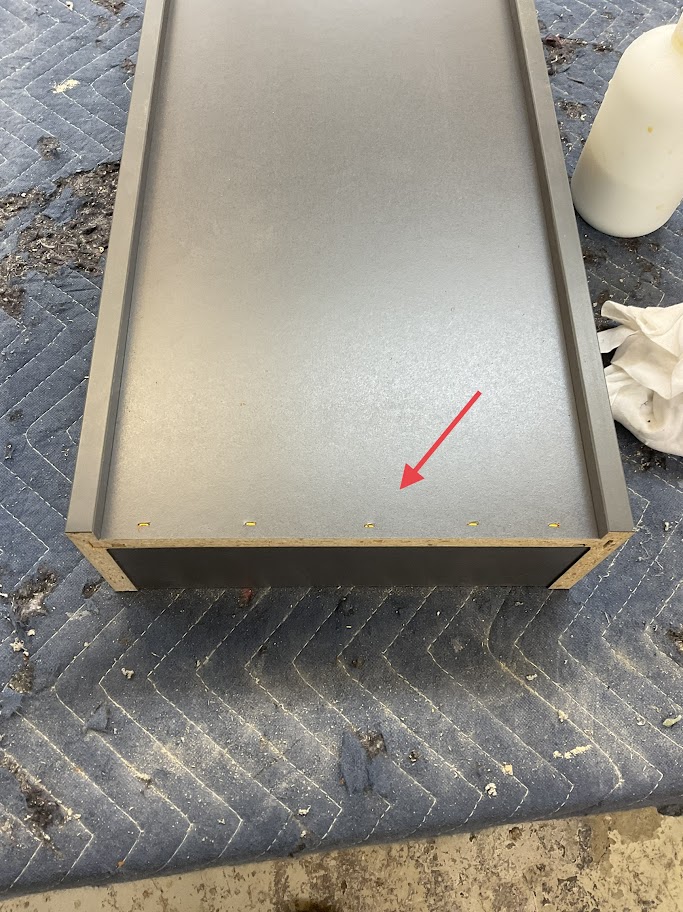
<table border="1" class="align-center" style="border-collapse: collapse; width: 100%; border-width: 0px; height: 349px;"><colgroup><col style="width: 50%;"></col><col style="width: 50%;"></col></colgroup><tbody><tr style="height: 349px;"><td class="align-left" style="border-width: 0px; vertical-align: middle; height: 349px;">**9. Place glue in the dado that the drawer box bottom will be placed**

</td><td style="border-width: 0px; height: 349px;">**[![Image 8.jpg](http://help.homesteadcabinet.net/uploads/images/gallery/2023-01/scaled-1680-/kUHimage-8.jpg)](http://help.homesteadcabinet.net/uploads/images/gallery/2023-01/kUHimage-8.jpg)**</td></tr></tbody></table>

<table border="1" class="align-center" style="border-collapse: collapse; width: 100%; border-width: 0px; height: 349px;"><colgroup><col style="width: 50%;"></col><col style="width: 50%;"></col></colgroup><tbody><tr style="height: 349px;"><td class="align-left" style="border-width: 0px; vertical-align: middle; height: 349px;">**10. With the glide holes up and facing toward the inside of the box, slide the bottom into the bottoms' dado**

</td><td style="border-width: 0px; height: 349px;">**[![Image 9.jpg](http://help.homesteadcabinet.net/uploads/images/gallery/2023-01/scaled-1680-/fMSimage-9.jpg)](http://help.homesteadcabinet.net/uploads/images/gallery/2023-01/fMSimage-9.jpg)**</td></tr></tbody></table>

<table border="1" class="align-center" style="border-collapse: collapse; width: 100%; border-width: 0px; height: 349px;"><colgroup><col style="width: 50%;"></col><col style="width: 50%;"></col></colgroup><tbody><tr style="height: 349px;"><td class="align-left" style="border-width: 0px; vertical-align: middle; height: 349px;">**11. Make sure the bottom is flush with the back**

</td><td style="border-width: 0px; height: 349px;">**[![Image 10.jpg](http://help.homesteadcabinet.net/uploads/images/gallery/2023-01/scaled-1680-/HZQimage-10.jpg)](http://help.homesteadcabinet.net/uploads/images/gallery/2023-01/HZQimage-10.jpg)**</td></tr></tbody></table>

<table border="1" class="align-center" style="border-collapse: collapse; width: 100%; border-width: 0px; height: 349px;"><colgroup><col style="width: 50%;"></col><col style="width: 50%;"></col></colgroup><tbody><tr style="height: 349px;"><td class="align-left" style="border-width: 0px; vertical-align: middle; height: 349px;">**12. Using a staple gun and the 1 1/4" staples secure the bottom to the back panel**

</td><td style="border-width: 0px; height: 349px;">**[![Image 11.jpg](http://help.homesteadcabinet.net/uploads/images/gallery/2023-01/scaled-1680-/bX0image-11.jpg)](http://help.homesteadcabinet.net/uploads/images/gallery/2023-01/bX0image-11.jpg)**</td></tr></tbody></table>

**13. Put fastcaps over drawer front screw holes to prevent cracking**

</details>

# Dovetail Jointer Instruction Procedure

<span style="text-decoration: underline;">**Purpose**</span>

**Dovetail joints make the drawer box stronger while still giving it a classier look**

<details id="bkmrk-powering-up-machine-"><summary>Powering Up Machine</summary>

<table border="1" class="align-center" style="border-collapse: collapse; width: 100%; border-width: 0px; height: 349px;"><colgroup><col style="width: 50%;"></col><col style="width: 50%;"></col></colgroup><tbody><tr style="height: 349px;"><td class="align-left" style="border-width: 0px; vertical-align: middle; height: 349px;">**1. Turn the switch to the on position, located on the right side of the machine**

</td><td style="border-width: 0px; height: 349px;">**[![Image 1.jpg](http://help.homesteadcabinet.net/uploads/images/gallery/2023-01/scaled-1680-/kbsimage-1.jpg)](http://help.homesteadcabinet.net/uploads/images/gallery/2023-01/kbsimage-1.jpg)**</td></tr></tbody></table>

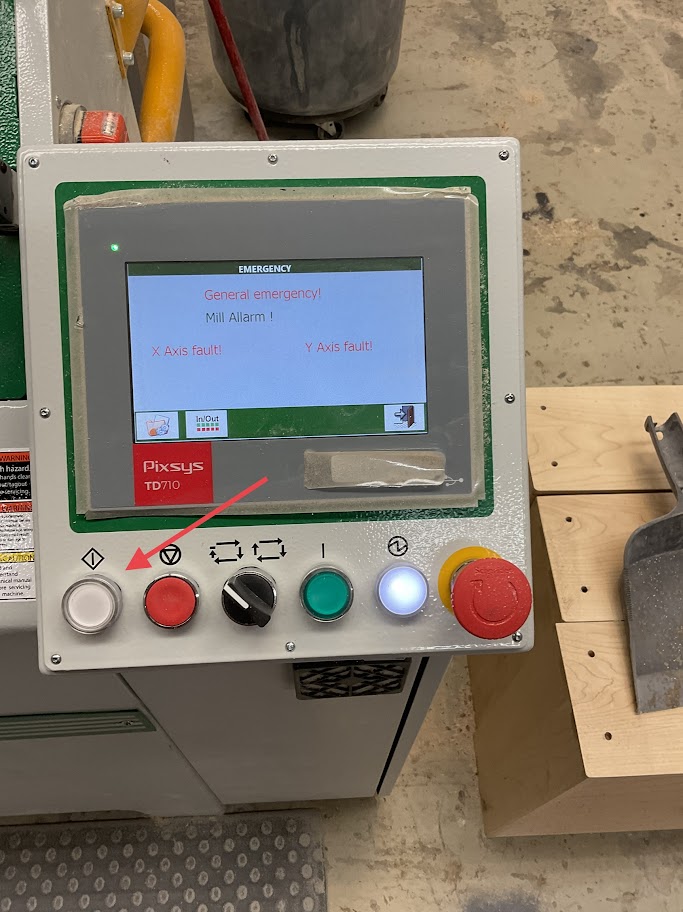
<table border="1" class="align-center" style="border-collapse: collapse; width: 100%; border-width: 0px; height: 349px;"><colgroup><col style="width: 50%;"></col><col style="width: 50%;"></col></colgroup><tbody><tr style="height: 349px;"><td class="align-left" style="border-width: 0px; vertical-align: middle; height: 349px;">**2. Press the white button on the left of the control panel**

</td><td style="border-width: 0px; height: 349px;">**[![Image 2.jpg](http://help.homesteadcabinet.net/uploads/images/gallery/2023-01/scaled-1680-/ddAimage-2.jpg)](http://help.homesteadcabinet.net/uploads/images/gallery/2023-01/ddAimage-2.jpg)**</td></tr></tbody></table>

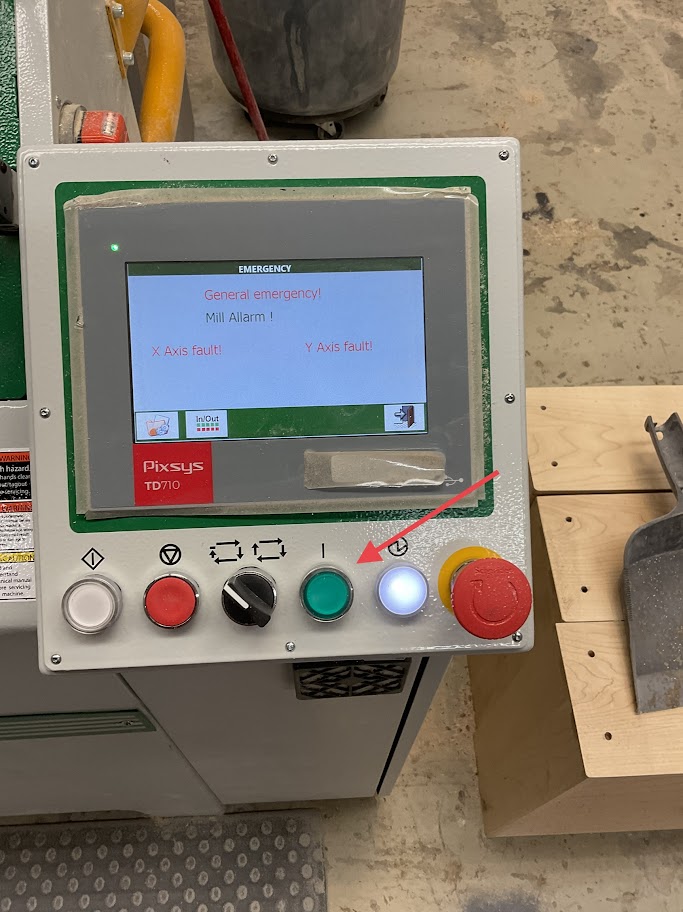
<table border="1" class="align-center" style="border-collapse: collapse; width: 100%; border-width: 0px; height: 349px;"><colgroup><col style="width: 50%;"></col><col style="width: 50%;"></col></colgroup><tbody><tr style="height: 349px;"><td class="align-left" style="border-width: 0px; vertical-align: middle; height: 349px;">**3. Press the green button on the right of the control panel**

</td><td style="border-width: 0px; height: 349px;">**[![Image 3.jpg](http://help.homesteadcabinet.net/uploads/images/gallery/2023-01/scaled-1680-/Z6Gimage-3.jpg)](http://help.homesteadcabinet.net/uploads/images/gallery/2023-01/Z6Gimage-3.jpg)**</td></tr></tbody></table>

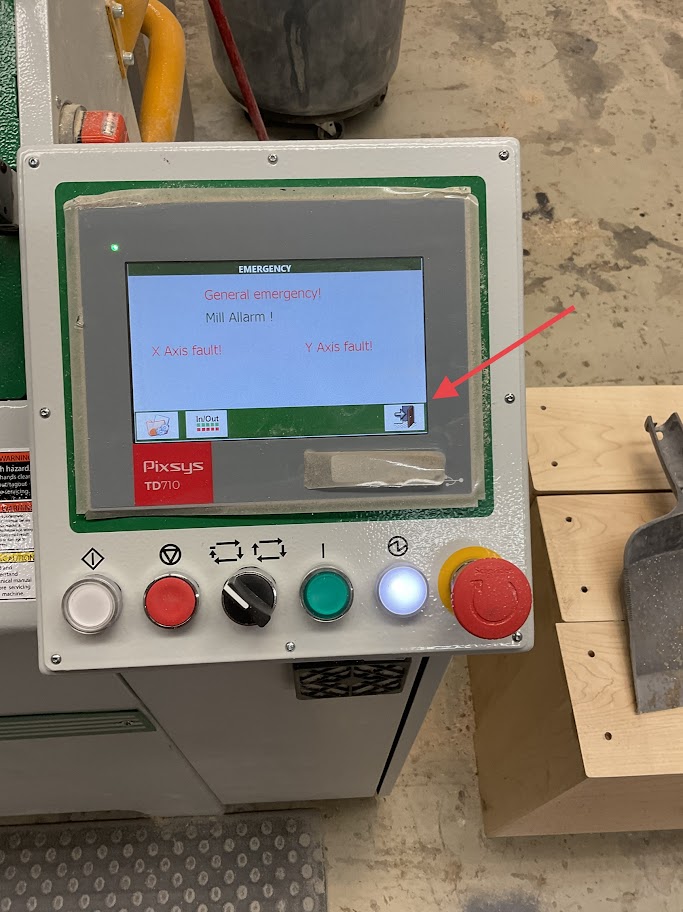
<table border="1" class="align-center" style="border-collapse: collapse; width: 100%; border-width: 0px; height: 349px;"><colgroup><col style="width: 50%;"></col><col style="width: 50%;"></col></colgroup><tbody><tr style="height: 349px;"><td class="align-left" style="border-width: 0px; vertical-align: middle; height: 349px;">**4. Press the open door icon located on the lower right side of the screen**

</td><td style="border-width: 0px; height: 349px;">**[![Image 4.jpg](http://help.homesteadcabinet.net/uploads/images/gallery/2023-01/scaled-1680-/u5zimage-4.jpg)](http://help.homesteadcabinet.net/uploads/images/gallery/2023-01/u5zimage-4.jpg)**</td></tr></tbody></table>

<table border="1" class="align-center" style="border-collapse: collapse; width: 100%; border-width: 0px; height: 349px;"><colgroup><col style="width: 50%;"></col><col style="width: 50%;"></col></colgroup><tbody><tr style="height: 349px;"><td class="align-left" style="border-width: 0px; vertical-align: middle; height: 349px;">**5. Press the Zero Research icon on the lower left side of the screen**

</td><td style="border-width: 0px; height: 349px;">**[![Image 5.jpg](http://help.homesteadcabinet.net/uploads/images/gallery/2023-01/scaled-1680-/rP5image-5.jpg)](http://help.homesteadcabinet.net/uploads/images/gallery/2023-01/rP5image-5.jpg)**</td></tr></tbody></table>

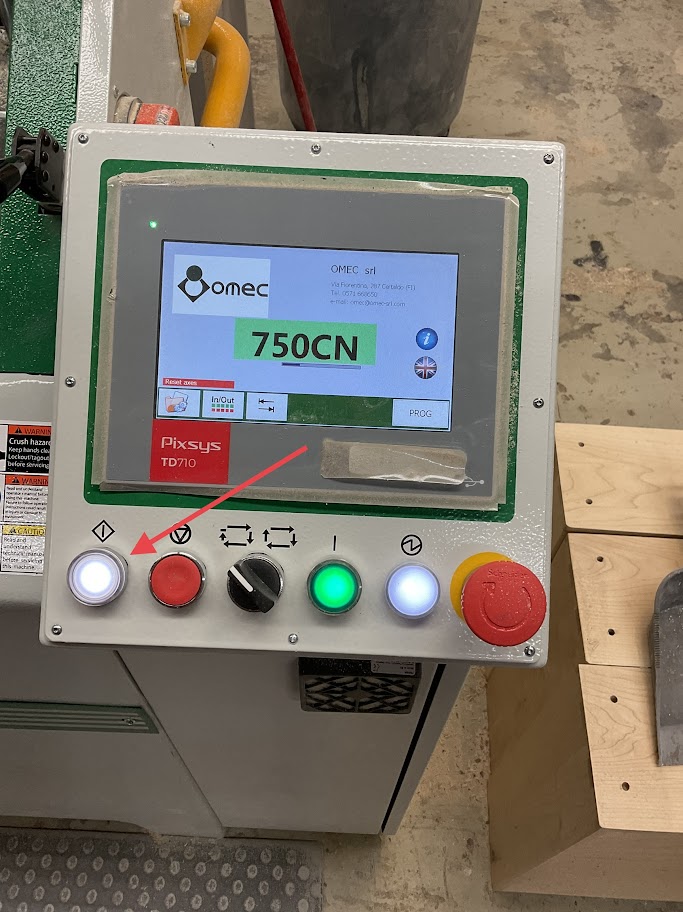
<table border="1" class="align-center" style="border-collapse: collapse; width: 100%; border-width: 0px; height: 349px;"><colgroup><col style="width: 50%;"></col><col style="width: 50%;"></col></colgroup><tbody><tr style="height: 349px;"><td class="align-left" style="border-width: 0px; vertical-align: middle; height: 349px;">**6. Press the white button on the left of the control panel**

</td><td style="border-width: 0px; height: 349px;">**[![Image 6.jpg](http://help.homesteadcabinet.net/uploads/images/gallery/2023-01/scaled-1680-/NBFimage-6.jpg)](http://help.homesteadcabinet.net/uploads/images/gallery/2023-01/NBFimage-6.jpg)**</td></tr></tbody></table>

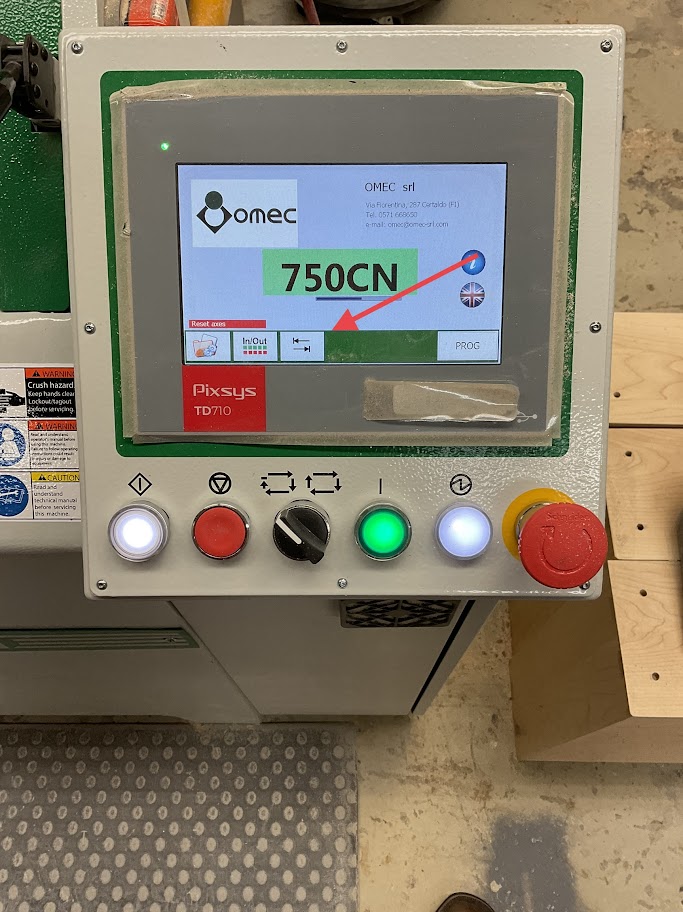
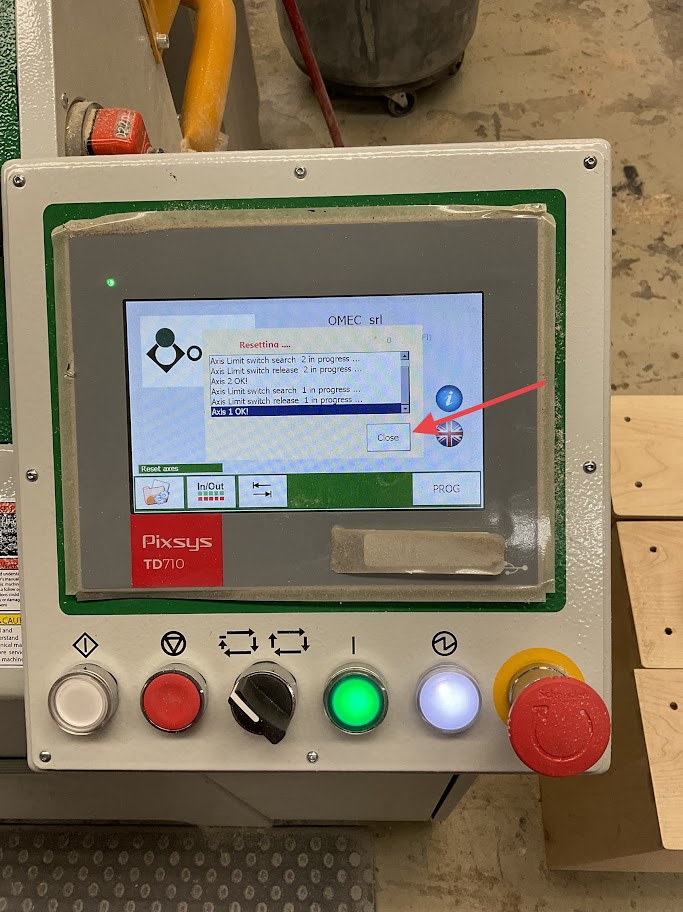
<table border="1" class="align-center" style="border-collapse: collapse; width: 100%; border-width: 0px; height: 349px;"><colgroup><col style="width: 50%;"></col><col style="width: 50%;"></col></colgroup><tbody><tr style="height: 349px;"><td class="align-left" style="border-width: 0px; vertical-align: middle; height: 349px;">**7. When the reset is complete press the close icon on the screen**

</td><td style="border-width: 0px; height: 349px;">**[![Image 7.jpg](http://help.homesteadcabinet.net/uploads/images/gallery/2023-01/scaled-1680-/gYNimage-7.jpg)](http://help.homesteadcabinet.net/uploads/images/gallery/2023-01/gYNimage-7.jpg)**</td></tr></tbody></table>

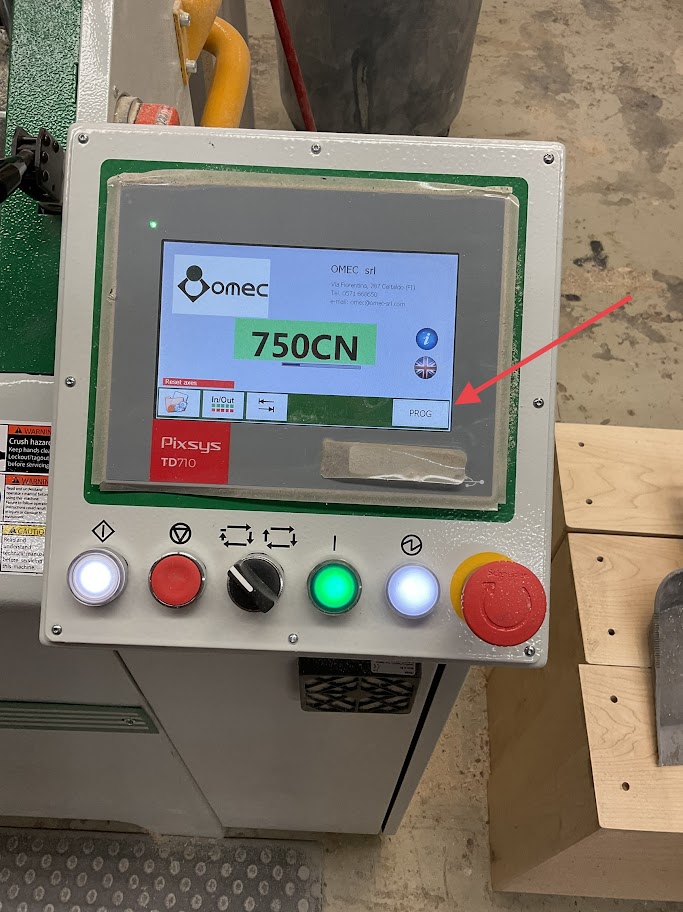
<table border="1" class="align-center" style="border-collapse: collapse; width: 100%; border-width: 0px; height: 349px;"><colgroup><col style="width: 50%;"></col><col style="width: 50%;"></col></colgroup><tbody><tr style="height: 349px;"><td class="align-left" style="border-width: 0px; vertical-align: middle; height: 349px;">**8. Press "PROG" icon on the lower right of the screen**

</td><td style="border-width: 0px; height: 349px;">**[![Image 8.jpg](http://help.homesteadcabinet.net/uploads/images/gallery/2023-01/scaled-1680-/4KMimage-8.jpg)](http://help.homesteadcabinet.net/uploads/images/gallery/2023-01/4KMimage-8.jpg)**</td></tr></tbody></table>

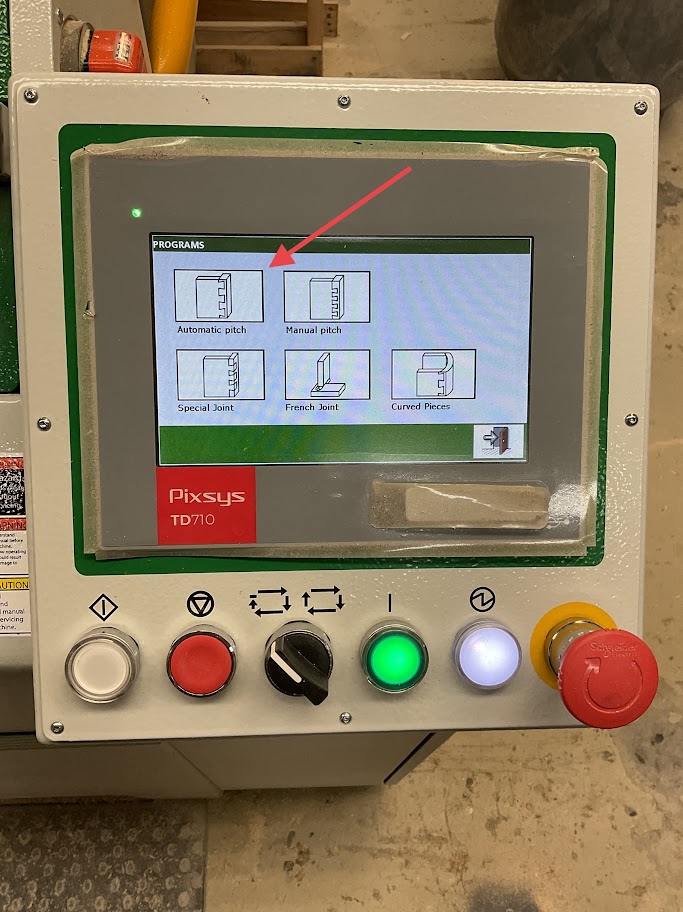
<table border="1" class="align-center" style="border-collapse: collapse; width: 100%; border-width: 0px; height: 349px;"><colgroup><col style="width: 50%;"></col><col style="width: 50%;"></col></colgroup><tbody><tr style="height: 349px;"><td class="align-left" style="border-width: 0px; vertical-align: middle; height: 349px;">**9. Select the "Automatic Pitch" icon on the upper left of the screen**

</td><td style="border-width: 0px; height: 349px;">**[![Image 9.jpg](http://help.homesteadcabinet.net/uploads/images/gallery/2023-01/scaled-1680-/BRCimage-9.jpg)](http://help.homesteadcabinet.net/uploads/images/gallery/2023-01/BRCimage-9.jpg)**</td></tr></tbody></table>

</details><details id="bkmrk-milling-set-up-10.-p"><summary>Milling Set Up</summary>

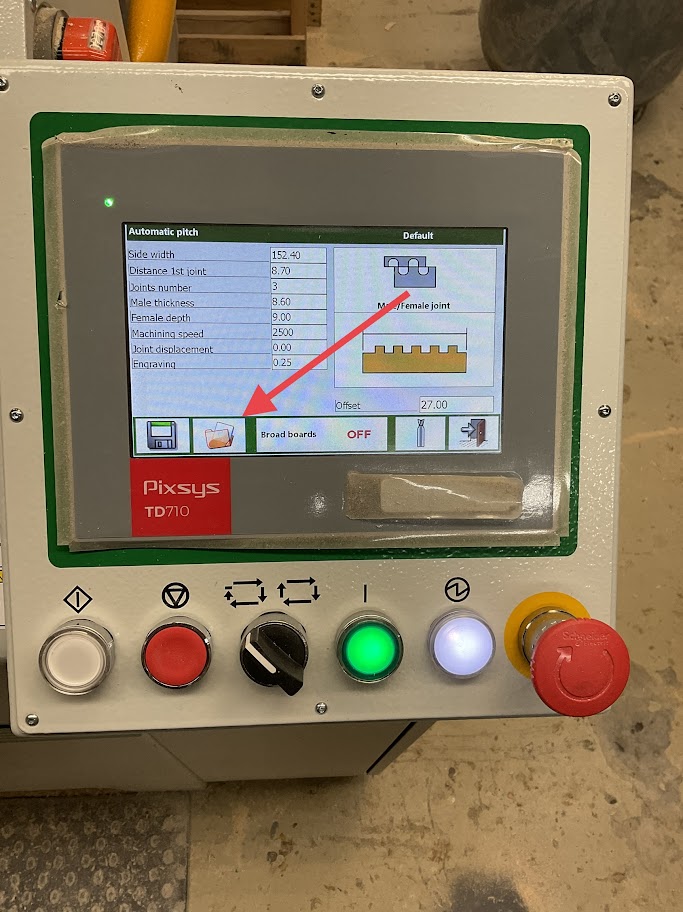
<table border="1" class="align-center" style="border-collapse: collapse; width: 100%; border-width: 0px; height: 349px;"><colgroup><col style="width: 50%;"></col><col style="width: 50%;"></col></colgroup><tbody><tr style="height: 349px;"><td class="align-left" style="border-width: 0px; vertical-align: middle; height: 349px;">**10. Press the Folder icon on the lower left of the screen**

</td><td style="border-width: 0px; height: 349px;">**[![Image 10.jpg](http://help.homesteadcabinet.net/uploads/images/gallery/2023-01/scaled-1680-/Qb4image-10.jpg)](http://help.homesteadcabinet.net/uploads/images/gallery/2023-01/Qb4image-10.jpg)**</td></tr></tbody></table>

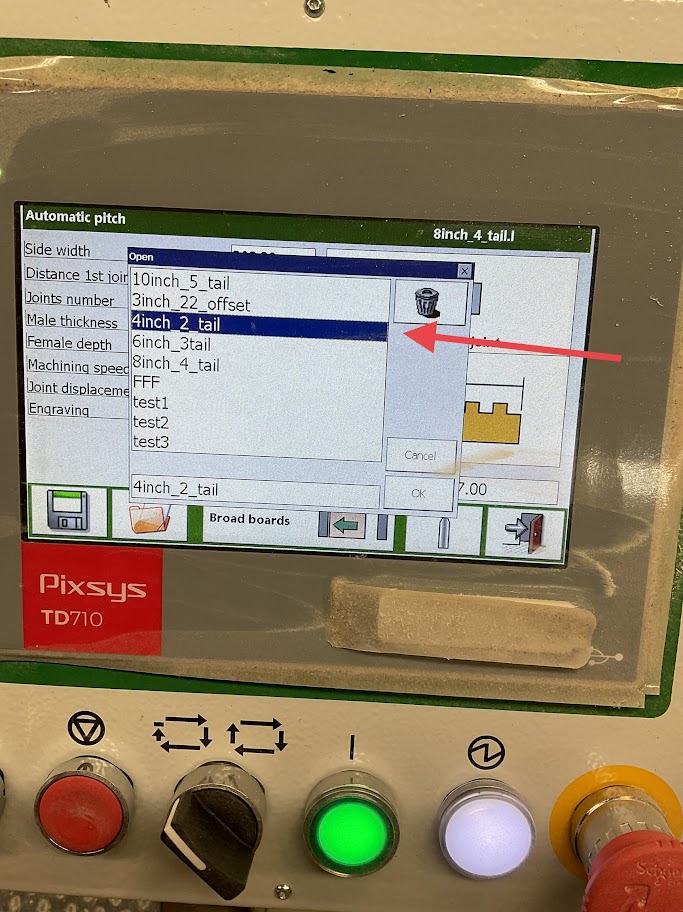
<table border="1" class="align-center" style="border-collapse: collapse; width: 100%; border-width: 0px; height: 349px;"><colgroup><col style="width: 50%;"></col><col style="width: 50%;"></col></colgroup><tbody><tr style="height: 349px;"><td class="align-left" style="border-width: 0px; vertical-align: middle; height: 349px;">**11. Select the file for the width of the board you will be milling**

<p class="callout info">***For example, if the board width is 4 inch select the "4inch" file***</p>

</td><td style="border-width: 0px; height: 349px;">**[![Image 11.jpg](http://help.homesteadcabinet.net/uploads/images/gallery/2023-01/scaled-1680-/g5Uimage-11.jpg)](http://help.homesteadcabinet.net/uploads/images/gallery/2023-01/g5Uimage-11.jpg)**</td></tr></tbody></table>

</details><details id="bkmrk-milling-board-12.-pl"><summary>Milling Board</summary>

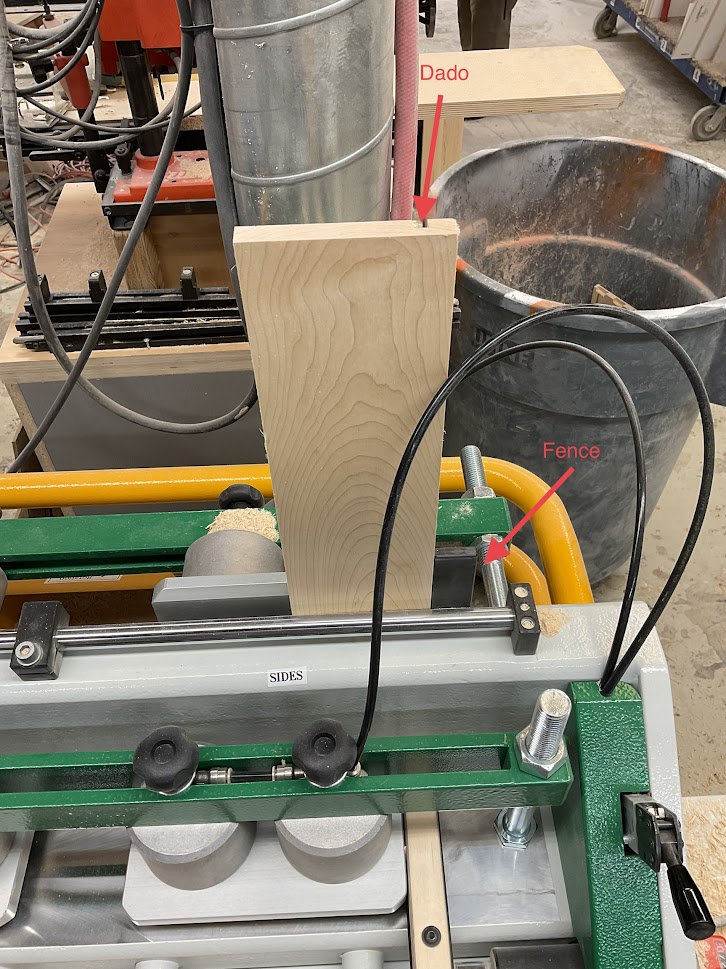
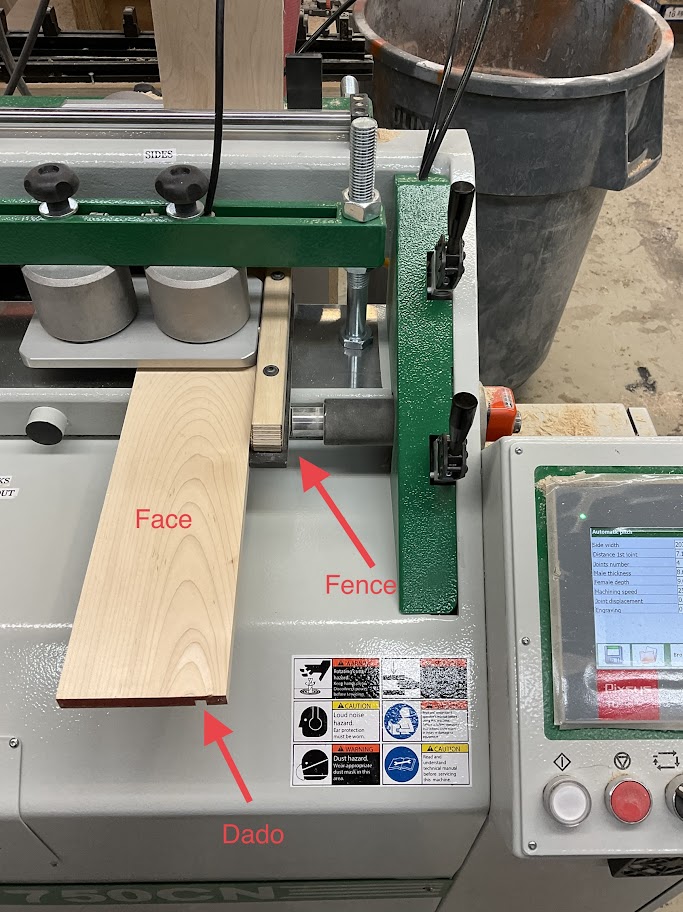
<table border="1" class="align-center" style="border-collapse: collapse; width: 100%; border-width: 0px; height: 349px;"><colgroup><col style="width: 50%;"></col><col style="width: 50%;"></col></colgroup><tbody><tr style="height: 349px;"><td class="align-left" style="border-width: 0px; vertical-align: middle; height: 349px;">**12. Place your side board in first with your panel being upright with the dado facing out and away flush against the fence**

</td><td style="border-width: 0px; height: 349px;">**[![Image 12.jpg](http://help.homesteadcabinet.net/uploads/images/gallery/2023-01/scaled-1680-/image-12.jpg)](http://help.homesteadcabinet.net/uploads/images/gallery/2023-01/image-12.jpg)**</td></tr></tbody></table>

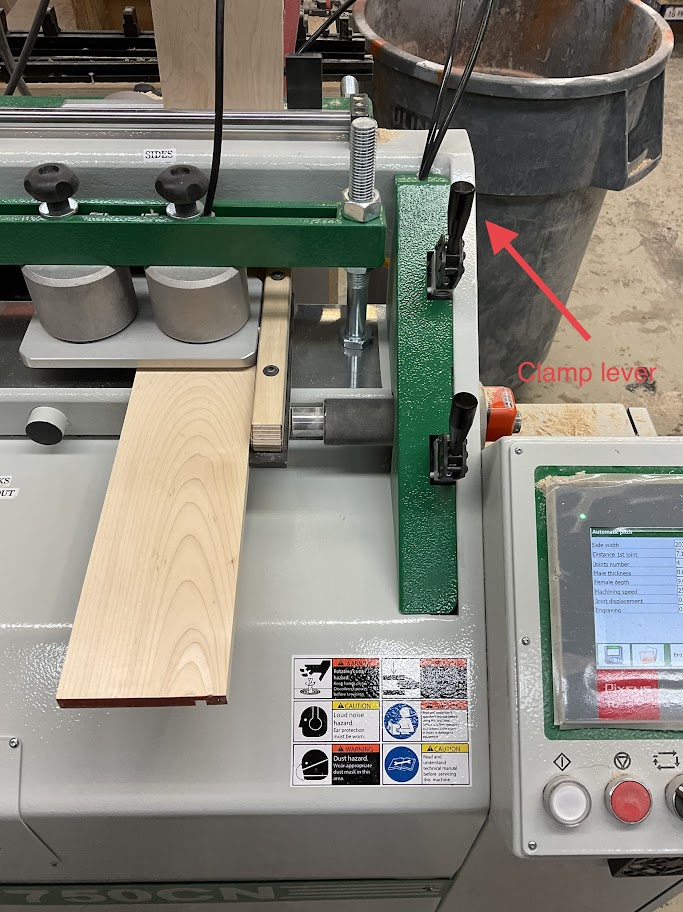
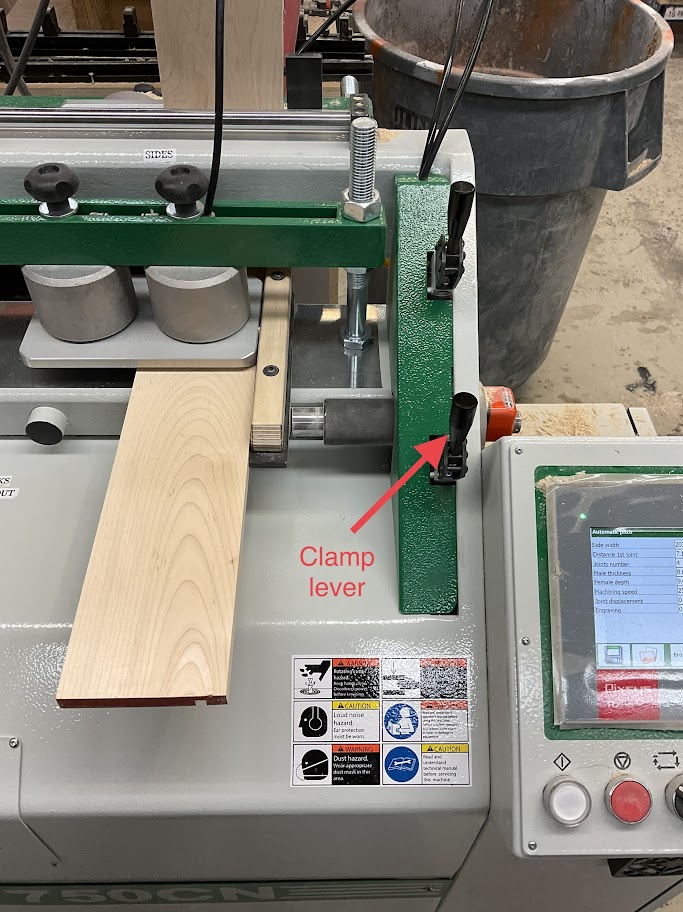
<table border="1" class="align-center" style="border-collapse: collapse; width: 100%; border-width: 0px; height: 349px;"><colgroup><col style="width: 50%;"></col><col style="width: 50%;"></col></colgroup><tbody><tr style="height: 349px;"><td class="align-left" style="border-width: 0px; vertical-align: middle; height: 349px;">**13. Push the clamp lever forward to secure the board in place**

</td><td style="border-width: 0px; height: 349px;">**[![Image 13.jpg](http://help.homesteadcabinet.net/uploads/images/gallery/2023-01/scaled-1680-/image-13.jpg)](http://help.homesteadcabinet.net/uploads/images/gallery/2023-01/image-13.jpg)**</td></tr></tbody></table>

<table border="1" class="align-center" style="border-collapse: collapse; width: 100%; border-width: 0px; height: 349px;"><colgroup><col style="width: 50%;"></col><col style="width: 50%;"></col></colgroup><tbody><tr style="height: 349px;"><td class="align-left" style="border-width: 0px; vertical-align: middle; height: 349px;">**14. Place your front or back board face up with the dado down and away flush against the side panel and flush against the fence**

</td><td style="border-width: 0px; height: 349px;">**[![Image 14.jpg](http://help.homesteadcabinet.net/uploads/images/gallery/2023-01/scaled-1680-/image-14.jpg)](http://help.homesteadcabinet.net/uploads/images/gallery/2023-01/image-14.jpg)**</td></tr></tbody></table>

<table border="1" class="align-center" style="border-collapse: collapse; width: 100%; border-width: 0px; height: 349px;"><colgroup><col style="width: 50%;"></col><col style="width: 50%;"></col></colgroup><tbody><tr style="height: 349px;"><td class="align-left" style="border-width: 0px; vertical-align: middle; height: 349px;">**15. Push the clamp lever forward to secure the board in place**

</td><td style="border-width: 0px; height: 349px;">**[![Image 15.jpg](http://help.homesteadcabinet.net/uploads/images/gallery/2023-01/scaled-1680-/image-15.jpg)](http://help.homesteadcabinet.net/uploads/images/gallery/2023-01/image-15.jpg)**</td></tr></tbody></table>

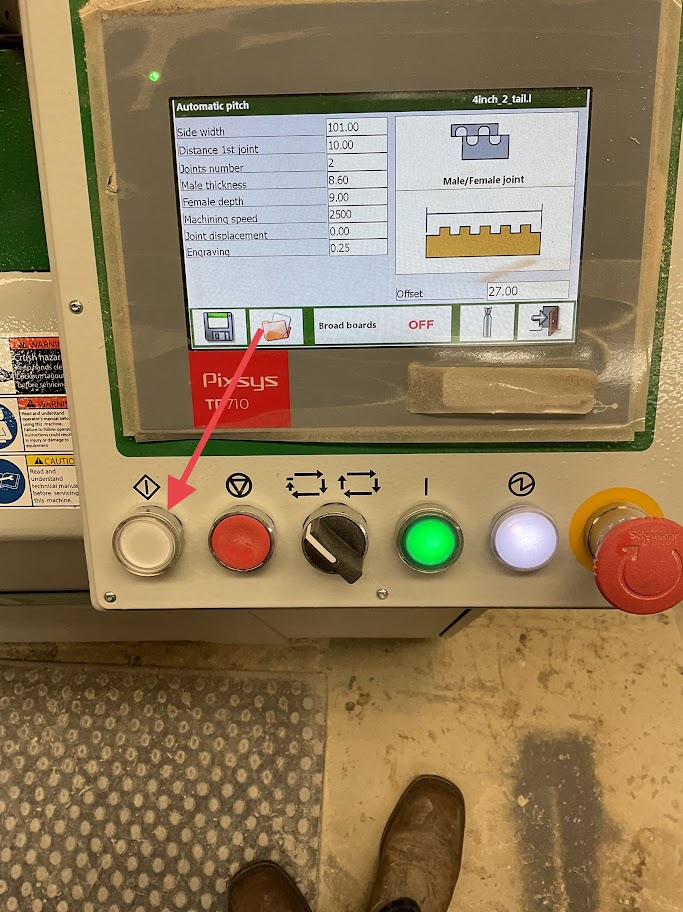
<table border="1" class="align-center" style="border-collapse: collapse; width: 100%; border-width: 0px; height: 349px;"><colgroup><col style="width: 50%;"></col><col style="width: 50%;"></col></colgroup><tbody><tr style="height: 349px;"><td class="align-left" style="border-width: 0px; vertical-align: middle; height: 349px;">**16. Once all boards are in place and secured press the white button on the left side of the control panel to start the milling process. Repeat these steps for the left side.**

<p class="callout warning">***Make sure to look up in the right side of the screen to make sure the correct file is selected for the board size that is going to be dovetailed***</p>

</td><td style="border-width: 0px; height: 349px;">**[![Image 16.jpg](http://help.homesteadcabinet.net/uploads/images/gallery/2023-01/scaled-1680-/image-16.jpg)](http://help.homesteadcabinet.net/uploads/images/gallery/2023-01/image-16.jpg)**</td></tr></tbody></table>

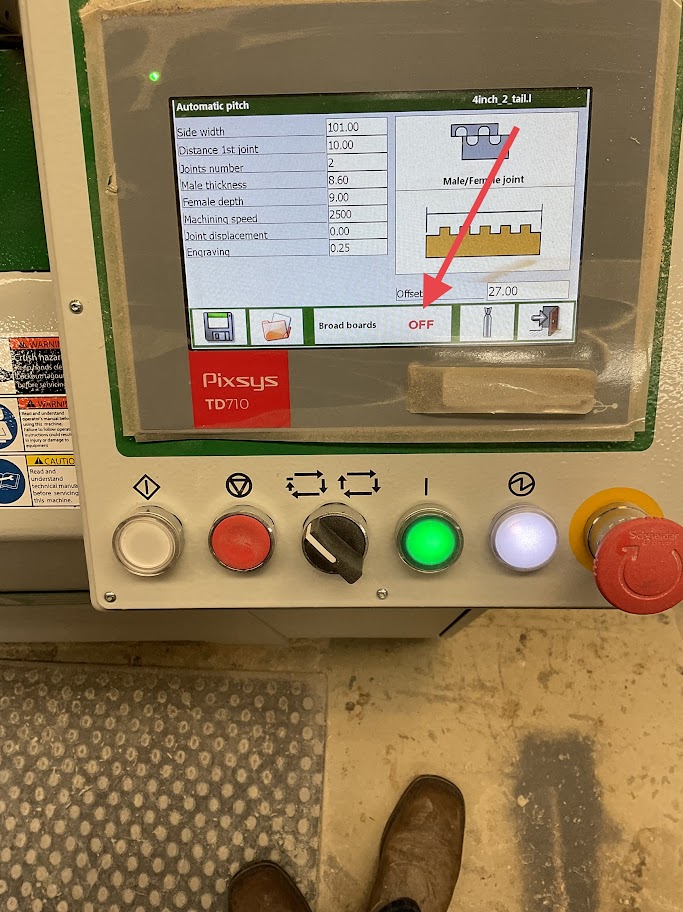
<table border="1" class="align-center" style="border-collapse: collapse; width: 100%; border-width: 0px; height: 349px;"><colgroup><col style="width: 50%;"></col><col style="width: 50%;"></col></colgroup><tbody><tr style="height: 349px;"><td class="align-left" style="border-width: 0px; vertical-align: middle; height: 349px;"><p class="callout warning">***17. Note, make sure that the "Broad Boards" icon is set to the side that the board will be milled. If boards are set on both sides made sure the "Broad Boards" icon says OFF***  
</p>

</td><td style="border-width: 0px; height: 349px;">**[![Image 17.jpg](http://help.homesteadcabinet.net/uploads/images/gallery/2023-01/scaled-1680-/image-17.jpg)](http://help.homesteadcabinet.net/uploads/images/gallery/2023-01/image-17.jpg)**</td></tr></tbody></table>

</details><details id="bkmrk-powering-off-machine"><summary>Powering off Machine</summary>

<table border="1" class="align-center" style="border-collapse: collapse; width: 100%; border-width: 0px; height: 349px;"><colgroup><col style="width: 50%;"></col><col style="width: 50%;"></col></colgroup><tbody><tr style="height: 349px;"><td class="align-left" style="border-width: 0px; vertical-align: middle; height: 349px;">**18. Simply turn the power switch in the off position, Located on the right side of the machine**

</td><td style="border-width: 0px; height: 349px;">**[![Image 18.jpg](http://help.homesteadcabinet.net/uploads/images/gallery/2023-01/scaled-1680-/image-18.jpg)](http://help.homesteadcabinet.net/uploads/images/gallery/2023-01/image-18.jpg)**</td></tr></tbody></table>

</details>