# Status Icons

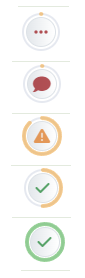
Status Icons are used in the Bid Program to quickly convey the status of a bid, room, or product without the need to open any additional pages. The purpose of this article is to explain the different status icons and their meanings.

<table border="1" class="align-center" id="bkmrk-bid-room-product-ima" style="border-collapse: collapse; width: 69.6296%; height: 403.016px;"><tbody class="align-center"><tr style="height: 63.8281px;"><td style="width: 33.3333%; vertical-align: middle; border-style: none; height: 63.8281px;">##### **Bid**

</td><td class="align-center" style="width: 33.3333%; vertical-align: middle; border-style: none; height: 63.8281px;">##### **Room**

</td><td class="align-center" style="width: 33.3333%; vertical-align: middle; border-style: none; height: 63.8281px;">##### **Product**

</td></tr><tr style="height: 310.391px;"><td class="align-center" style="width: 33.3333%; vertical-align: middle; border-style: none; height: 310.391px;">[![image-1653077091134.png](http://help.homesteadcabinet.net/uploads/images/gallery/2022-05/scaled-1680-/image-1653077091134.png)](http://help.homesteadcabinet.net/uploads/images/gallery/2022-05/image-1653077091134.png)

</td><td class="align-center" style="width: 33.3333%; vertical-align: middle; border-style: none; height: 310.391px;">[![image-1653077099698.png](http://help.homesteadcabinet.net/uploads/images/gallery/2022-05/scaled-1680-/image-1653077099698.png)](http://help.homesteadcabinet.net/uploads/images/gallery/2022-05/image-1653077099698.png)

</td><td class="align-center" style="width: 33.3333%; vertical-align: middle; border-style: none; height: 310.391px;">[![image-1653077105750.png](http://help.homesteadcabinet.net/uploads/images/gallery/2022-05/scaled-1680-/image-1653077105750.png)](http://help.homesteadcabinet.net/uploads/images/gallery/2022-05/image-1653077105750.png)

</td></tr><tr style="height: 28.7969px;"><td class="align-center" colspan="3" style="vertical-align: middle; border-style: none; height: 28.7969px; width: 100%;"><span style="color: #e67e23;">**Image 1.**</span> Bid, Room, and Product Status Icons.  
</td></tr></tbody></table>

#### Bid

The status bar around the bid status icon represents the combined number of approved products and rooms out of the total number of products and rooms.

[![image-1653078627285.png](http://help.homesteadcabinet.net/uploads/images/gallery/2022-05/scaled-1680-/image-1653078627285.png)](http://help.homesteadcabinet.net/uploads/images/gallery/2022-05/image-1653078627285.png)The bid has not yet been submitted. This same icon is used for unsubmitted rooms and products.

[![image-1653078683145.png](http://help.homesteadcabinet.net/uploads/images/gallery/2022-05/scaled-1680-/image-1653078683145.png)](http://help.homesteadcabinet.net/uploads/images/gallery/2022-05/image-1653078683145.png)The bid has been submitted and there are changes pending approval. or requested.

[![image-1653078724463.png](http://help.homesteadcabinet.net/uploads/images/gallery/2022-05/scaled-1680-/image-1653078724463.png)](http://help.homesteadcabinet.net/uploads/images/gallery/2022-05/image-1653078724463.png)The bid has been submitted and is currently locked and under review by a project manager.

[![image-1653078751141.png](http://help.homesteadcabinet.net/uploads/images/gallery/2022-05/scaled-1680-/image-1653078751141.png)](http://help.homesteadcabinet.net/uploads/images/gallery/2022-05/image-1653078751141.png)The bid has been returned to you with questions.

[![image-1653078778484.png](http://help.homesteadcabinet.net/uploads/images/gallery/2022-05/scaled-1680-/image-1653078778484.png)](http://help.homesteadcabinet.net/uploads/images/gallery/2022-05/image-1653078778484.png)The bid is ready for your final approval.

[![image-1653078810235.png](http://help.homesteadcabinet.net/uploads/images/gallery/2022-05/scaled-1680-/image-1653078810235.png)](http://help.homesteadcabinet.net/uploads/images/gallery/2022-05/image-1653078810235.png)The bid is fully approved and ready for production / produced.

#### Room

The status bar around the room status icon represents the total number of items approved out of the total number of items in the room.

[![image-1653079194976.png](http://help.homesteadcabinet.net/uploads/images/gallery/2022-05/scaled-1680-/image-1653079194976.png)](http://help.homesteadcabinet.net/uploads/images/gallery/2022-05/image-1653079194976.png)The room is new and has not been review by a project manager.

[![image-1653079203909.png](http://help.homesteadcabinet.net/uploads/images/gallery/2022-05/scaled-1680-/image-1653079203909.png)](http://help.homesteadcabinet.net/uploads/images/gallery/2022-05/image-1653079203909.png)The room has been reviewed but no status has been set by a project manager.

[![image-1653079215247.png](http://help.homesteadcabinet.net/uploads/images/gallery/2022-05/scaled-1680-/image-1653079215247.png)](http://help.homesteadcabinet.net/uploads/images/gallery/2022-05/image-1653079215247.png)Changes or clarification has been requested, check the room revision notes for details.

[![image-1653079233345.png](http://help.homesteadcabinet.net/uploads/images/gallery/2022-05/scaled-1680-/image-1653079233345.png)](http://help.homesteadcabinet.net/uploads/images/gallery/2022-05/image-1653079233345.png)The room specs are approved, but there are unapproved items in the room.

[![image-1653079243390.png](http://help.homesteadcabinet.net/uploads/images/gallery/2022-05/scaled-1680-/image-1653079243390.png)](http://help.homesteadcabinet.net/uploads/images/gallery/2022-05/image-1653079243390.png)The room specs and all the items are fully approved.

#### Product

[![image-1653079429957.png](http://help.homesteadcabinet.net/uploads/images/gallery/2022-05/scaled-1680-/image-1653079429957.png)](http://help.homesteadcabinet.net/uploads/images/gallery/2022-05/image-1653079429957.png)The product is new and has not been reviewed by a project manager.

[![image-1653079440528.png](http://help.homesteadcabinet.net/uploads/images/gallery/2022-05/scaled-1680-/image-1653079440528.png)](http://help.homesteadcabinet.net/uploads/images/gallery/2022-05/image-1653079440528.png)The bid has been reviewed but no status has been set by a project manager.

[![image-1653079446289.png](http://help.homesteadcabinet.net/uploads/images/gallery/2022-05/scaled-1680-/image-1653079446289.png)](http://help.homesteadcabinet.net/uploads/images/gallery/2022-05/image-1653079446289.png)There are changes or clarification requested, check the product revision notes for details.

[![image-1653079451632.png](http://help.homesteadcabinet.net/uploads/images/gallery/2022-05/scaled-1680-/image-1653079451632.png)](http://help.homesteadcabinet.net/uploads/images/gallery/2022-05/image-1653079451632.png)The product is fully approved.

### Status Menus

Clicking on any of the status icons will open a status menu giving you access to the row color, unapproved items, and revision notes. On unsubmitted orders, only the row color will be visible. These menus are to serve as a quick snapshot of what else needs to be approved or answered in the bid, room, or product. Below are snap shots of how each of these menus may look.

[![image-1653080026312.png](http://help.homesteadcabinet.net/uploads/images/gallery/2022-05/scaled-1680-/image-1653080026312.png)](http://help.homesteadcabinet.net/uploads/images/gallery/2022-05/image-1653080026312.png)

<span style="color: #e67e23;">**Image 2.**</span> Bid status menu.

[![image-1653080216805.png](http://help.homesteadcabinet.net/uploads/images/gallery/2022-05/scaled-1680-/image-1653080216805.png)](http://help.homesteadcabinet.net/uploads/images/gallery/2022-05/image-1653080216805.png)

<span style="color: #e67e23;">**Image 3.**</span> Room status menu.

[![image-1653080342703.png](http://help.homesteadcabinet.net/uploads/images/gallery/2022-05/scaled-1680-/image-1653080342703.png)](http://help.homesteadcabinet.net/uploads/images/gallery/2022-05/image-1653080342703.png)

<span style="color: #e67e23;">**Image 4.**</span> Product status menu.